Benzinga Pro pricing · 2026
Benzinga Pro pricing and alternatives
Benzinga Pro costs $37, $147 or $197 a month in 2026 for its Basic, Streamlined and Essential plans, or $30.58 to $166.42 a month billed annually, with a 14-day free trial (prices checked 30 October 2026). The audio squawk starts at $147; the scanner, signals and Benzinga AI need the $197 Essential plan. Here is what each plan includes, and seven alternatives that cost less or do more.
Transparency: Senntric publishes this page and is one of the alternatives listed. Benzinga Pro’s prices come from benzinga.com/pro/pricing and every alternative’s price from its own pricing page, all checked 30 October 2026. We name a different pick for each workflow.
Benzinga Pro plans · checked 30 October 2026
Benzinga Pro pricing: what each plan includes.
Three plans, billed monthly or annually (up to 17% less). Every plan starts with a 14-day free trial. The equity Audio Squawk starts on Streamlined; the scanner, signals, calendars and Benzinga AI need Essential.
Basic
No squawk$37/month
$30.58/month billed annually
- Real-time quotes (Nasdaq Basic)
- Full newsfeed, no advanced filtering
- Movers, watchlist alerts and chat
- Benzinga premium articles
Streamlined
Squawk$147/month
$124.75/month billed annually
- Everything in Basic
- Advanced newsfeed filters (price, volume, float)
- Audio Squawk (Equity)
Essential
Squawk$197/month
$166.42/month billed annually
- Everything in Streamlined
- Real-Time Scanner, Signals, Insiders
- Market events calendar
- Benzinga AI and Benzinga Edge research
- Elite trading community (7 rooms)
Source: benzinga.com/pro/pricing, checked 30 October 2026. Essential billed annually is $1,997 a year. High Beta Squawk is a $99/month add-on. Prices exclude taxes and change; confirm before subscribing.
At a glance
Benzinga Pro vs 7 alternatives.Side by side.
Public list prices from each vendor’s own pricing page, checked 30 October 2026. Plans, billing and data fees change; confirm before subscribing.
 Senntric
Best forConnected news, squawk, charts and GEX
Audio squawkAI squawk of your alerts, included
Options / GEXGEX profiles + heatmaps
Public price$149/month, everything included
 Benzinga Pro
Best forBreaking U.S. stock news + scanners
Audio squawkStreamlined and Essential
Options / GEXOptions tools
Public priceBasic $37; Streamlined $147; Essential $197/mo
 Newsquawk
Best forAnalyst audio squawk + macro
Audio squawkCore (1 or 6 channels)
Options / GEXOption activity on Pro
Public priceBasic $199; Pro $399/mo (ex VAT)
 Trade Ideas
Best forAI scans + execution
Audio squawkSound alerts
Options / GEXNot primary focus
Public priceStandard $127; Premium $254/mo ($89 / $178 annual)
 TrendSpider
Best forAutomated technical analysis
Audio squawkNot core
Options / GEXNot primary focus
Public priceFour plans, $54–$349/mo at list; 14-day trial from $19
 Unusual Whales
Best forOptions flow + dark pools
Audio squawkNot core
Options / GEXOptions flow, core
Public priceFree (2-day delay); Retail $50–$120/mo
Best forScreening + maps
Audio squawkNot core
Options / GEXNot primary focus
Public priceElite $39.50/mo or $299.50/yr
 TradingView
Best forCharts + ecosystem
Audio squawkNot core
Options / GEXVaries by plan
Public priceFree; paid $12.95–$199.95/mo (annual)
Pricing
What Benzinga Pro costs against the alternatives.
Monthly list prices, checked 30 October 2026. Annual billing lowers most of them.
Benzinga Pro Essential
Scanner, squawk, signals, calendars, AI
$197/mo
Benzinga Pro Streamlined
Newsfeed, advanced filters, equity squawk
$147/mo
Senntric
News, AI squawk, events, charts and GEX in one plan
$149/mo
Unusual Whales Retail
Options flow and dark pools; free delayed plan
$50–$120/mo
Finviz Elite
Real-time screening, charts and alerts
$39.50/mo
Benzinga Pro Basic
Newsfeed and movers, no squawk
$37/mo
Platform by platform
7 Benzinga Pro alternatives,each for a different trader.
- 01
Cheaper all-in-oneSenntricBest for: Active traders who want news, squawk, charts and options positioning in one workspace for less than Essential.
Senntric is an agentic trading workspace. Real-time news, Active Events, an AI audio squawk of your own alerts, earnings and economic releases with actual versus estimate, advanced charts and GEX profiles sit on one screen. One plan, $149/month, with no tiers, so nothing is held back for a higher plan the way Benzinga keeps its scanner, calendars and AI for Essential.
Get startedStrengths
- News, squawk, events, charts and GEX connected
- One price, no feature tiers
- Costs less than Benzinga Pro Essential
Trade-offs
- Squawk is an AI voice reading your alerts, not Benzinga’s human newsdesk
- No Benzinga-exclusive wire stories
- A newer product than Benzinga
- 02
Human squawkNewsquawkBest for: Macro and futures traders who want analysts calling headlines across asset classes.
Newsquawk Basic is $199 (£175) a month for one squawk channel of Forex, Energy or Metals, with headlines, research and the economic calendar. Pro is $399 (£350) a month for all six channels, including Multi-Asset Global Macro, Equities and Fixed Income, plus an Equities Suite with SEC filings, option activity and block trades. Prices exclude VAT; the Pro trial is 7 days for $29.99.
Strengths
- Professional multi-asset audio
- Live analyst chat and research
- Option activity on Pro
Trade-offs
- Costs more than Benzinga Pro
- Charts and positioning live elsewhere
Sources: Newsquawk pricing
- 03
AI scanningTrade IdeasBest for: Traders whose session starts with scans, AI signals and execution rather than headlines.
Trade Ideas Standard is $127 a month ($89 billed annually) and Premium $254 a month ($178 billed annually), with AI signals, backtesting and smart risk levels on Premium. A free account is also offered.
Strengths
- Real-time customizable scans
- AI signals and backtesting on Premium
- Free account
Trade-offs
- News is supporting context
- The full desktop app is built mainly for Windows
Sources: Trade Ideas pricing
- 04
Technical automationTrendSpiderBest for: Technical traders who want automated chart analysis, scanning, backtesting and bots.
TrendSpider sells four plans, Standard, Premium, Enhanced and Advanced, at list prices from $54 to $349 a month depending on plan and billing, with first-year promotional discounts shown on its pricing page. Each plan starts with a 14-day paid trial (from $19).
Strengths
- Automated technical analysis
- Scanning, backtesting and alerts
- AI-assisted analysis
Trade-offs
- Paid trial, not free
- Live news and event context are secondary
Sources: TrendSpider pricing
- 05
Options flowUnusual WhalesBest for: Options traders who want flow, dark-pool and positioning data at the center.
Unusual Whales has a free plan that shows the platform delayed two trading days, then Retail Basic at $50, Retail Pro at $75 and Retail Max at $120 a month, or $404, $605 and $980 a year. Its pricing page also showed a limited-time sale when we checked.
Strengths
- Options flow and dark-pool data
- Free delayed plan
- Cheaper than Benzinga Essential
Trade-offs
- Options-first workflow
- No audio squawk
Sources: Unusual Whales pricing
- 06
Finviz Elite
ScreeningBest for: Screen-first researchers who want real-time quotes, maps, backtests and alerts cheaply.
Finviz Elite is $39.50 a month or $299.50 a year (about $24.96 a month), with a free trial that needs a card. It adds real-time quotes and charts, advanced screening, backtesting, alerts and exports to the free Finviz site.
Strengths
- The cheapest paid option here
- Fast screening and heat maps
- Free trial
Trade-offs
- No squawk or live event context
- Screen-first rather than news-first
Sources: Finviz Elite
- 07
ChartingTradingViewBest for: Chart-centric traders who want broad market coverage, News Flow and alerts.
TradingView has a free Basic plan, then Essential $12.95, Plus $29.95, Premium $59.95 and Ultimate $199.95 a month billed annually. News Flow, screeners, calendars and alerts are built into the charting platform.
Strengths
- Free plan
- Best-in-class charts and community
- News Flow with filters
Trade-offs
- No squawk
- Some real-time exchange data costs extra
Sources: TradingView pricing
In the product
The headline,with the reaction attached.
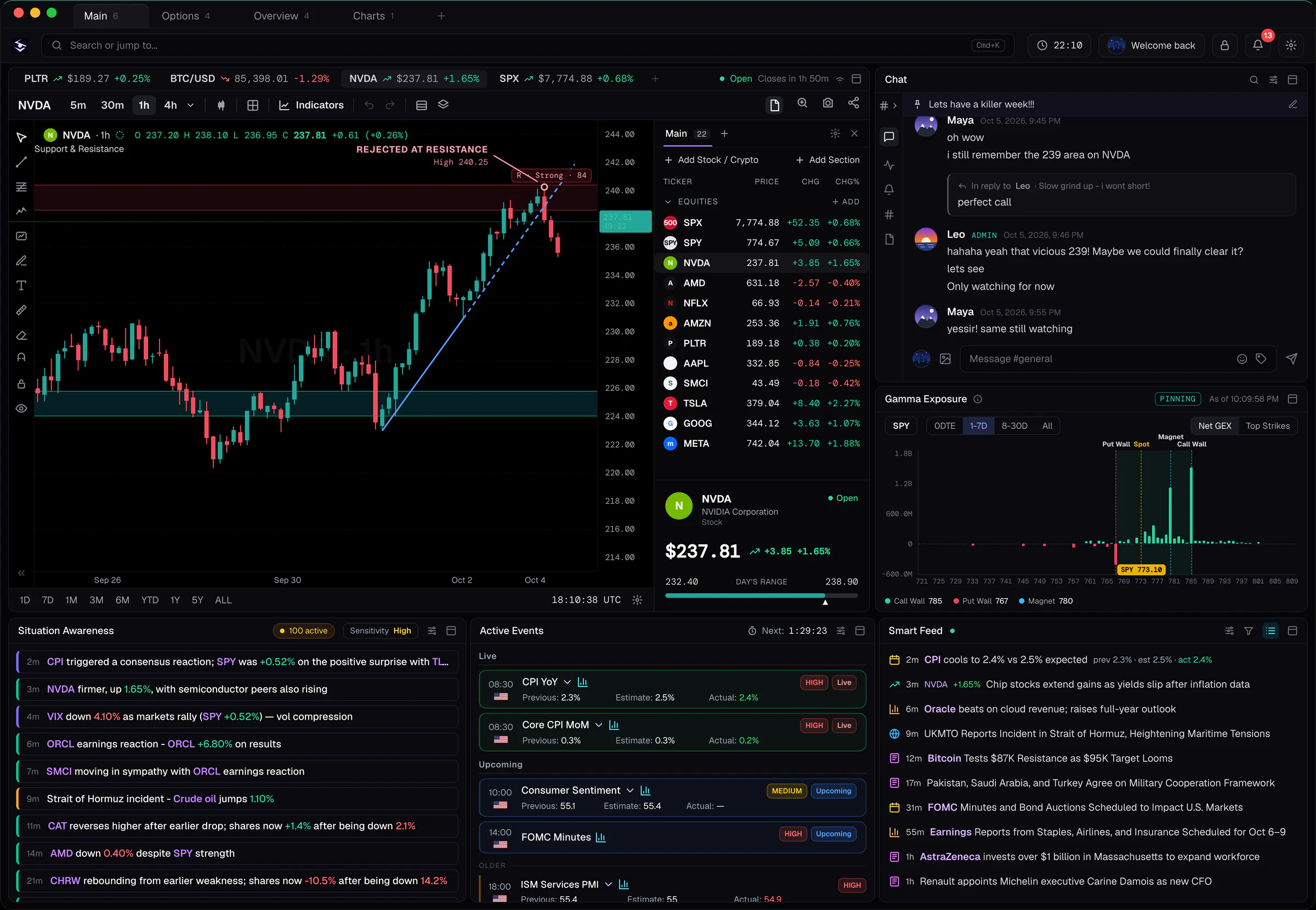
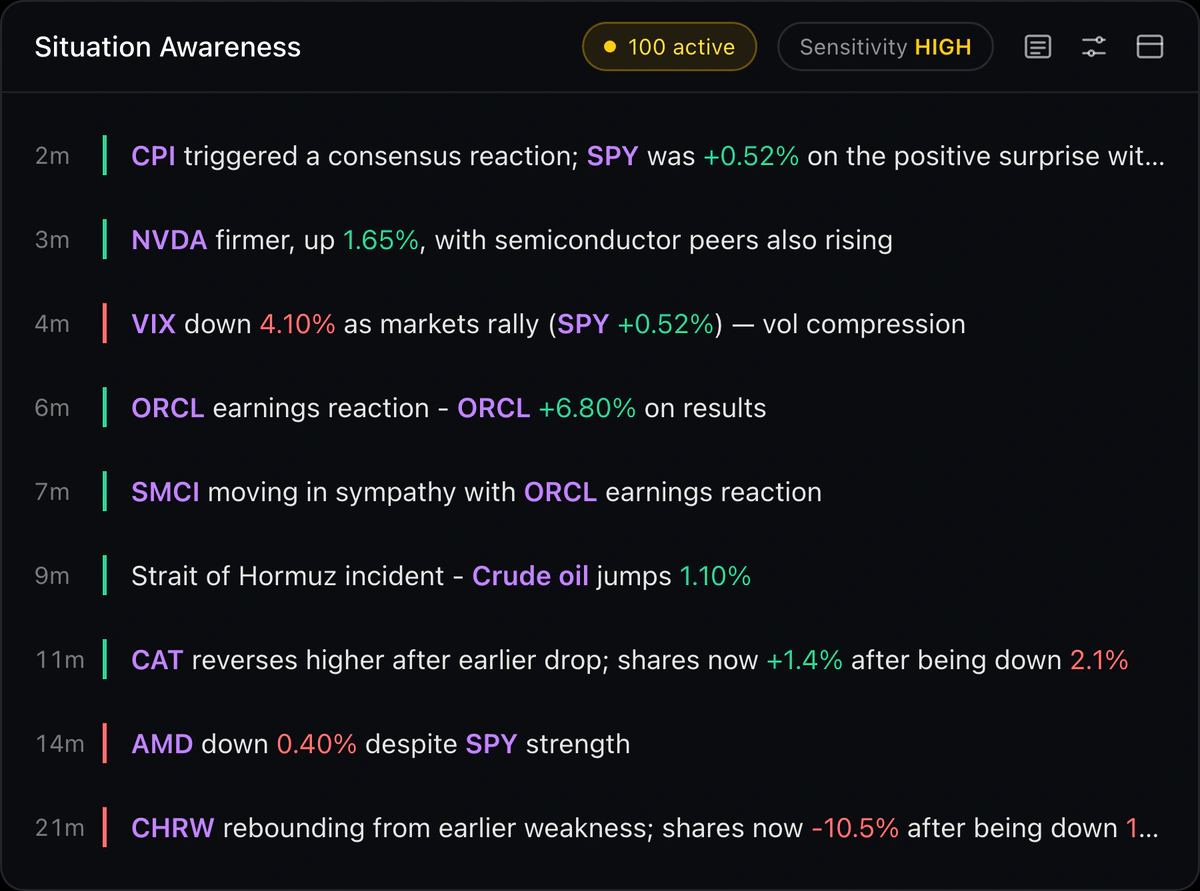
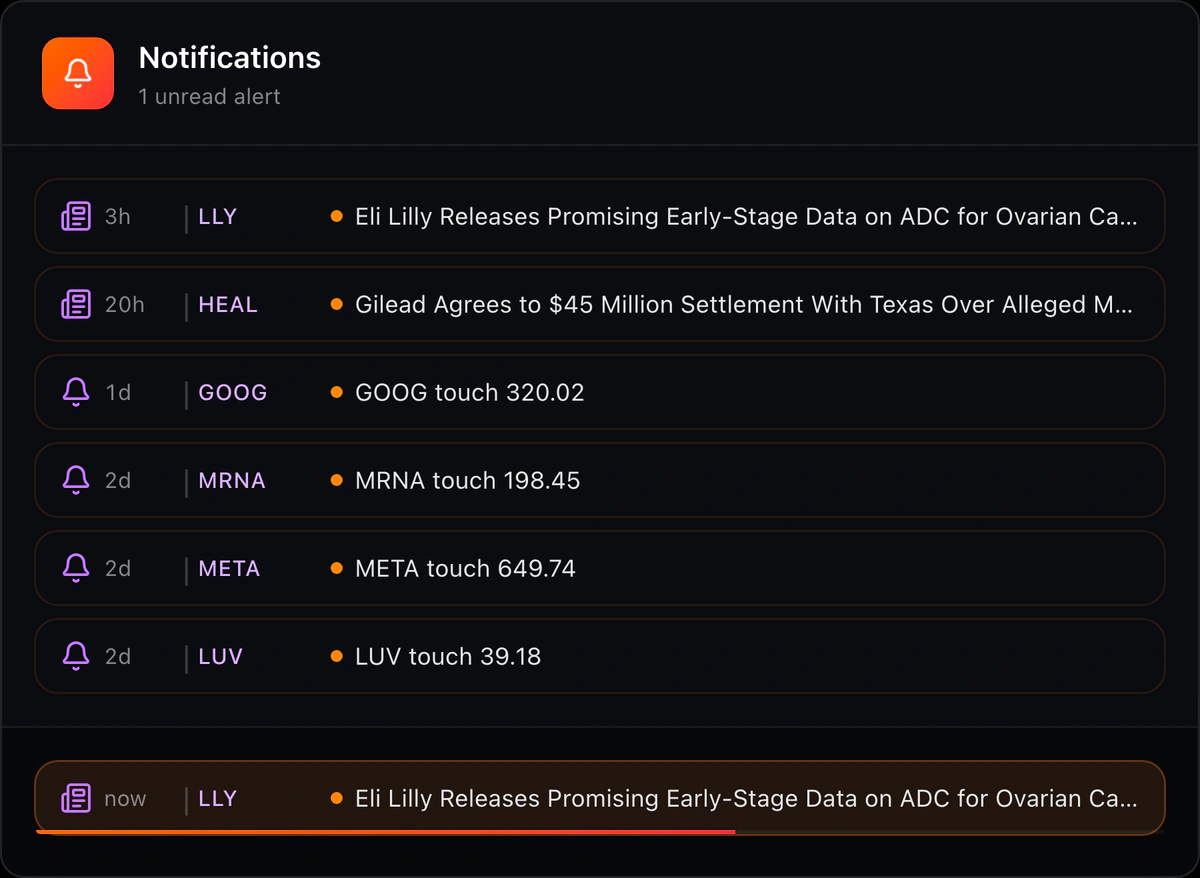
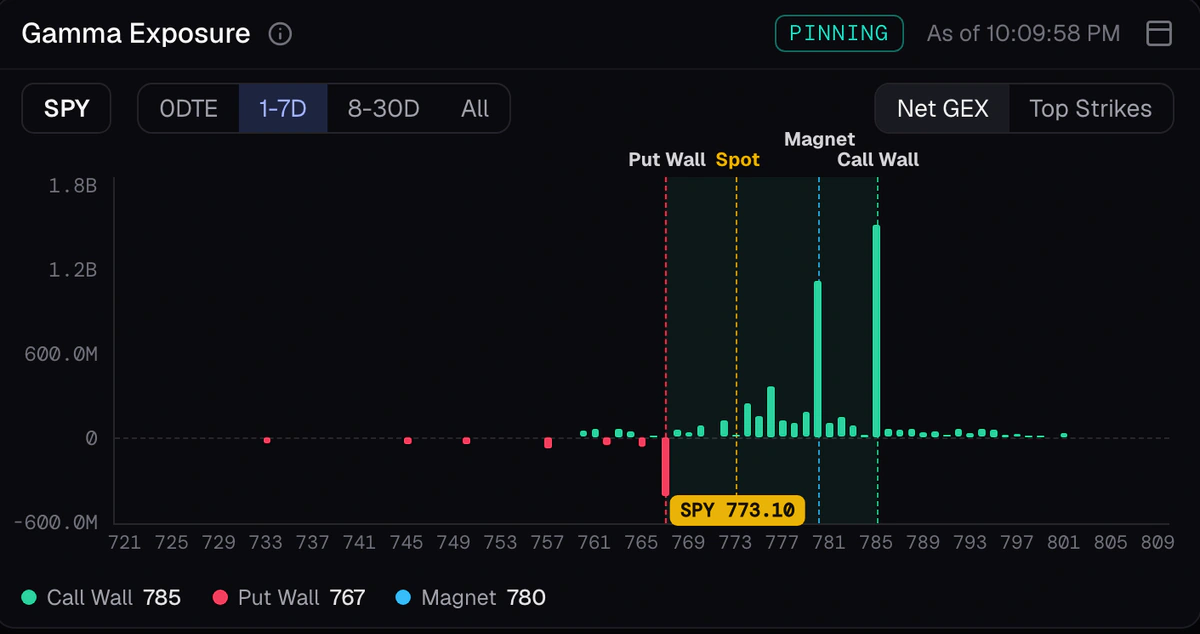
What the all-in-one alternative looks like in practice. These panels show Senntric’s actual interface.

Which should you choose?
Keep Benzinga Pro, or switch?
Pick by the first question you ask each session.
What is breaking in U.S. stocks right now?
Benzinga ProWhat did the Fed, CPI or OPEC just say? (human squawk)
NewsquawkWhich stocks match my scan and AI signals?
Trade IdeasWhat does the chart pattern say, automatically?
TrendSpiderWhere is the big options flow going?
Unusual WhalesWhich stocks pass my screen, cheaply?
Finviz EliteWhy is this moving, and does positioning support it?
Senntric
The verdict
Is Benzinga Pro worth it?
Benzinga Pro is a strong product. Whether it is worth $197 a month depends on how much of Essential you would use.
Worth it
You day trade breaking U.S. stock news and will use the squawk, scanner and signals every session. Essential is the plan built for that.
Pay less
You only read the newsfeed. Basic at $37 a month has the full feed; skip Streamlined unless you need the squawk or advanced filters.
Look elsewhere
You want the headline connected to the chart, the reaction and options positioning. Senntric puts news, an AI squawk, charts and GEX in one workspace for $149/month.
Feature by feature: Senntric vs Benzinga Pro. Squawk only: the best stock squawk services. All news tools: the best news platforms for trading.
Get startedQuestions traders ask
Benzinga Pro pricing FAQ
How much does Benzinga Pro cost per month?
As of 30 October 2026, Benzinga Pro costs $37 a month for Basic, $147 for Streamlined and $197 for Essential, billed monthly. Billed annually, the same plans work out to $30.58, $124.75 and $166.42 a month. Prices are from benzinga.com/pro/pricing and exclude taxes.
How much does Benzinga Pro cost per year?
Benzinga Pro Essential is $1,997 a year billed annually, which Benzinga shows as $166.42 a month, against $197 a month on monthly billing. Benzinga says annual plans save up to 17%, and the 14-day free trial still applies.
What is the difference between Benzinga Pro Basic, Streamlined and Essential?
Basic ($37) has real-time quotes, the full newsfeed without advanced filters, movers, watchlist alerts and chat. Streamlined ($147) adds advanced newsfeed filters and the equity Audio Squawk. Essential ($197) adds the Real-Time Scanner, Signals, Insiders, the market events calendar, Benzinga AI, Benzinga Edge research and the trading community.
How much is Benzinga Pro squawk?
Benzinga’s equity Audio Squawk is not sold on its own: it starts on Streamlined at $147 a month and is included in Essential at $197. The High Beta Squawk is a separate $99/month add-on. The squawk is a live human newsdesk from 6 am to 6 pm ET. Compare the best stock squawk services.
Does Benzinga Pro have a free trial?
Yes. Benzinga Pro offers a 14-day free trial that you can cancel at any time, on monthly and annual plans.
Is there a free version of Benzinga Pro?
Benzinga Pro itself starts at Basic, $37 a month; its pricing page lists Basic as “every free feature plus” the paid tools. For free alternatives, TradingView has a free Basic plan, Unusual Whales a free plan delayed two trading days, and Trade Ideas a free account.
Is Benzinga Pro worth it?
It is worth it if you trade breaking U.S. stock news and will use what Essential adds: the scanner, signals, calendars and squawk. If you mainly want the newsfeed, Basic at $37 may be enough. If you want news connected to charts and options positioning, compare Essential’s $197 against an all-in-one workspace before paying for both. See Senntric vs Benzinga Pro.
What is the best Benzinga Pro alternative in 2026?
It depends on the workflow. Senntric is the closest all-in-one alternative for active traders who want real-time news, an audio squawk, charts, GEX and alerts in one workspace. Newsquawk is the audio specialist, Trade Ideas the scanner, TrendSpider the technical-automation tool, Unusual Whales the options-flow tool, Finviz Elite the screener and TradingView the charting platform.
What is a cheaper alternative to Benzinga Pro?
Senntric pricing: USD 149.00/month, billed monthly. News, squawk, charts and GEX are included, against $197 a month for Benzinga Pro Essential. Finviz Elite ($39.50 a month) and Unusual Whales (from $50 a month) cost less still but have no squawk.
Is there a free Benzinga Pro alternative?
TradingView’s free Basic plan includes News Flow and charts, Unusual Whales has a free plan delayed two trading days, and FinancialJuice offers free text and voice squawk headlines. None replaces Benzinga’s real-time stock newsroom, but together they cover the basics. Compare the best news platforms for trading.
Which Benzinga Pro alternative is best for options flow?
Unusual Whales is the specialist for options flow, dark-pool data and market-maker exposure. Senntric is the broader option when GEX and positioning need to sit beside news, events, price action and alerts.
One plan, everything included
Less than Essential. More context.
News, squawk, events, charts and GEX in one agentic trading workspace.
Get started