Tutorial · Sena alerts

Stock alerts with AI, in one sentence.

No forms, no dropdowns: tell Sena what you want to know and when, and it sets the alert. Price levels, closes, moving averages and gaps, on 1-minute to daily candles.

Education, not investment advice. Sena never places trades.

By Konsta · Updated November 2026

Step by step

Your first AI alert, in under a minute.

  1. 1Step 1 of 6

    Open Sena

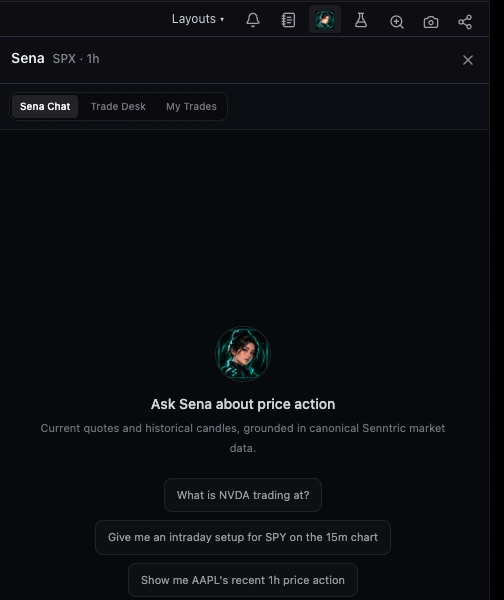
    Click the Sena button in the chart toolbar, or type /sena in the command bar. Sena Chat opens beside your chart.
    The Sena panel open beside the chart, with the Sena button highlighted in the chart toolbar and the Sena Chat tab ready for a question
  2. 2Step 2 of 6

    Ask for the alert in one sentence

    Say the symbol, the level, and whether a touch is enough or you want a candle to close. Sena saves it straight away and confirms under its reply.

    Alert me if SPY closes below 730 on the 15m
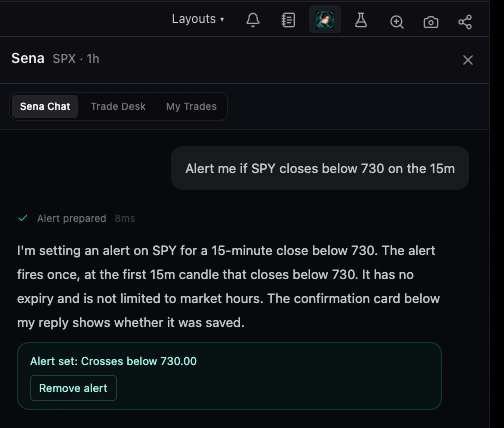
    Sena Chat: the request to alert if SPY closes below 730 on the 15-minute chart, Sena’s reply explaining the alert fires once on the first 15-minute close below 730, and an Alert set card with a Remove alert button
  3. 3Step 3 of 6

    Add options in the same sentence

    Every time instead of once, regular hours only, or an expiry. Moving averages and gaps work the same way.

    Alert me every time NVDA touches its 20 EMA on the 5m, regular hours only, for a week
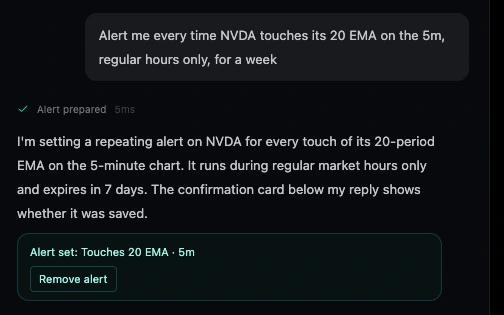
    Sena Chat: a repeating alert for every touch of NVDA’s 20-period EMA on the 5-minute chart, regular hours only, expiring in 7 days, confirmed with an Alert set card
  4. 4Step 4 of 6

    Find it under Price alerts

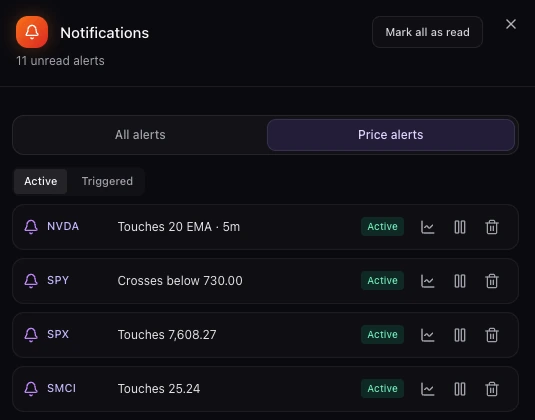
    Open notifications, then Price alerts. Sena’s alerts sit with the ones you set on the chart, where you can view, pause or delete them.
    Notifications panel on the Price alerts tab, Active list: NVDA touches 20 EMA on the 5m and SPY crosses below 730.00 at the top, each with chart, pause and delete buttons
  5. 5Step 5 of 6

    Get told when it fires

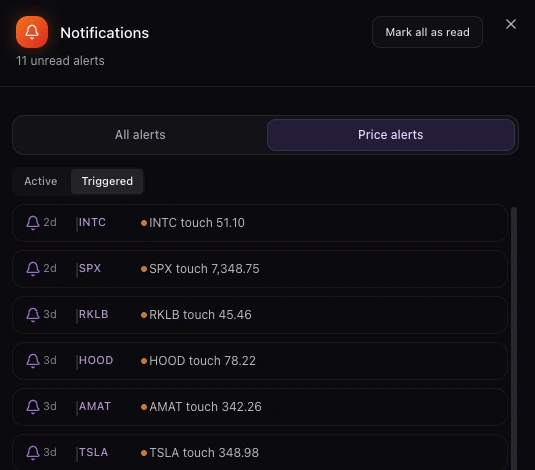
    A pop-up appears the moment it triggers, and the alert moves to Triggered with the time it fired.
    Notifications panel on the Price alerts Triggered list: recent alerts such as INTC touch 51.10, SPX touch 7,348.75 and NVDA touch 195.26, each with how long ago it fired
  6. 6Step 6 of 6

    Hear it, not just see it

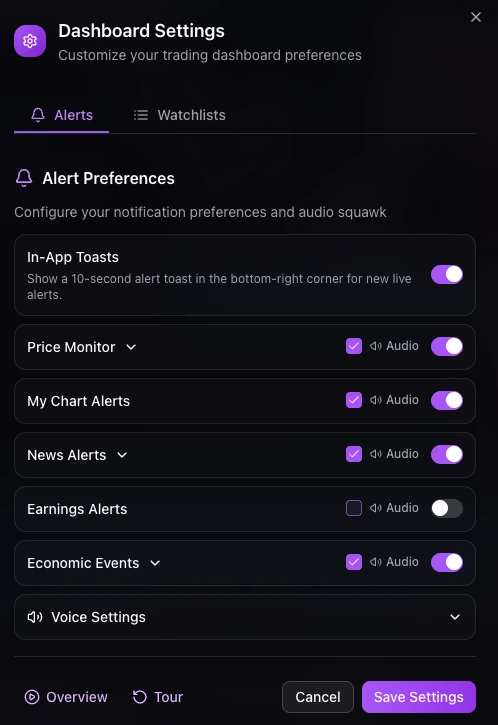
    In Settings, then Alerts, tick Audio next to My Chart Alerts. The audio squawk reads your alerts aloud as they fire.
    Dashboard Settings, Alerts tab: alert preferences with In-App Toasts, Price Monitor, My Chart Alerts with Audio ticked, News Alerts, Earnings Alerts and Economic Events

Copy a prompt

Four kinds of alert, one sentence each.

Price touch

Fires the moment price reaches a level, even on a wick.

Alert me when NVDA touches 190

Alert set: Touches 190.00

Candle close

Waits for a candle on your timeframe to close beyond the level.

Alert me if SPY closes below 730 on the 15m

Alert set: Crosses below 730.00

Moving average

Touch, near, or close above or below an EMA or SMA, 2 to 500 periods.

Tell me if TSLA closes above its 50 EMA on the 1h

Alert set: Closes above 50 EMA · 1h

Gap

Price nears or fills an open gap. With no date, Sena uses the nearest one.

Alert me when AAPL fills its gap

Alert set: Fills gap · the nearest open one

1m to daily candlesOnce or every timeRegular hours onlyExpires in 1 day to a year

Add any of these to the same sentence. Want the levels first? Ask Sena for a plan, then set alerts at its trigger and stop.

Questions

AI stock alerts FAQ

Can AI set stock alerts for me?

Yes. In Senntric, ask Sena in plain English, for example “alert me if SPY closes below 730 on the 15m”. Sena saves the alert and shows a card under its reply with a Remove alert button.

What kinds of alerts can Sena set?

Price touches and crosses, closes above or below a level, moving-average touches, approaches and closes (EMA or SMA, 2 to 500 periods), and gap approaches and fills, on timeframes from 1 minute to daily.

How will I get the alert?

In Senntric: a pop-up and an entry under Price alerts in your notifications. You can also have alerts read aloud by turning on My Chart Alerts in the squawk settings.

Will Sena set an alert without asking?

No. Sena only sets an alert when you ask for one. If it cannot set the one you asked for, it says so and saves nothing.

What is the difference between a touch and a close alert?

A touch fires the moment price reaches the level, even on a wick. A close alert waits for a candle on your timeframe to close beyond the level, which filters out brief spikes.

Try it in Senntric

Stop watching the chart. Let Sena watch the level.

Alerts from one sentence, delivered as a pop-up or read aloud by the squawk.

Educational, not investment advice. Part of the Sena user guide.