Tutorial · Trade Desk
AI trade setups: found and scored.
Sena scans the market on every closed 5-minute candle and writes up the setups worth a look, with the entry, stop, target and every reason. Here is how to read one, and what happens when you track it.
Education, not investment advice. Sena never places trades.
How Sena finds them
Three things Sena scans for.
On every closed 5-minute candle in regular hours, across 20 of the most traded US stocks and ETFs.
Support or resistance
Price approaching a strong level that several timeframes agree on.
Open gaps
An unfilled daily gap in play before 2:00 pm ET.
Support breakdowns
On risk-off days, a first clean break of support, as a short.
On crash days the rules change. When QQQ is down 2% or more, or SPY 1% or more, Sena takes no new longs.
Step by step
From scan to chart, with a real setup.
Sena’s GOOGL long from November 5: found at 10:49 ET, first target hit at 11:05 for +0.81R.
1Step 1 of 4
Open Trade Desk
In the Sena panel, open the Trade Desk tab. Setups are grouped by day, newest first. Show Ideas to hide the scans Sena passed on, or Discarded to see why it passed.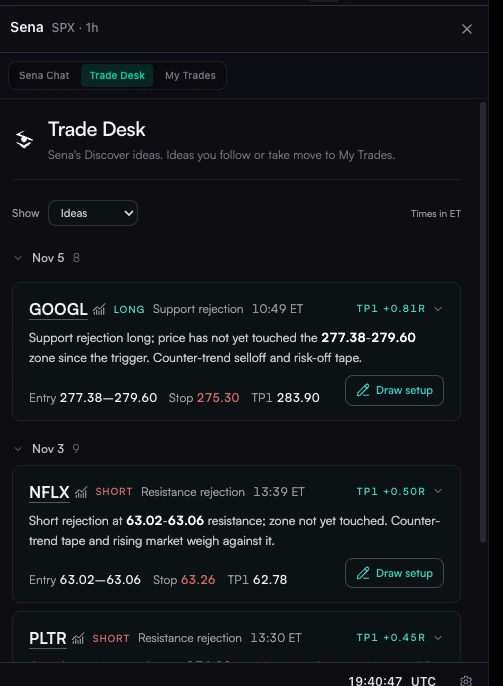
2Step 2 of 4
Read the plan
Open a setup to see the entry zone, the stop, both targets and the risk per share, then why Sena found it and the evidence behind it.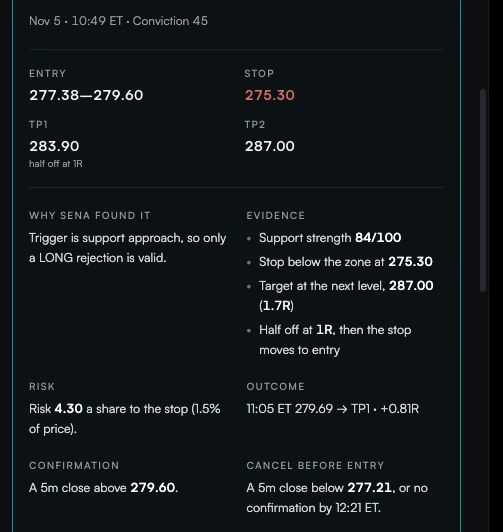
3Step 3 of 4
Wait for the confirmation
Every plan says what confirms it and what cancels it. Ready only shows once that candle has closed. Ready is a signal to decide, not an order.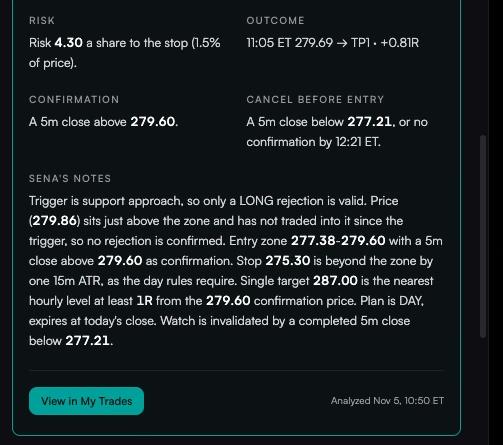
4Step 4 of 4
Draw it on your chart
Press Draw setup. The entry zone, the confirmation level, the stop and both targets go straight onto the chart, so you can see the trade before you take it.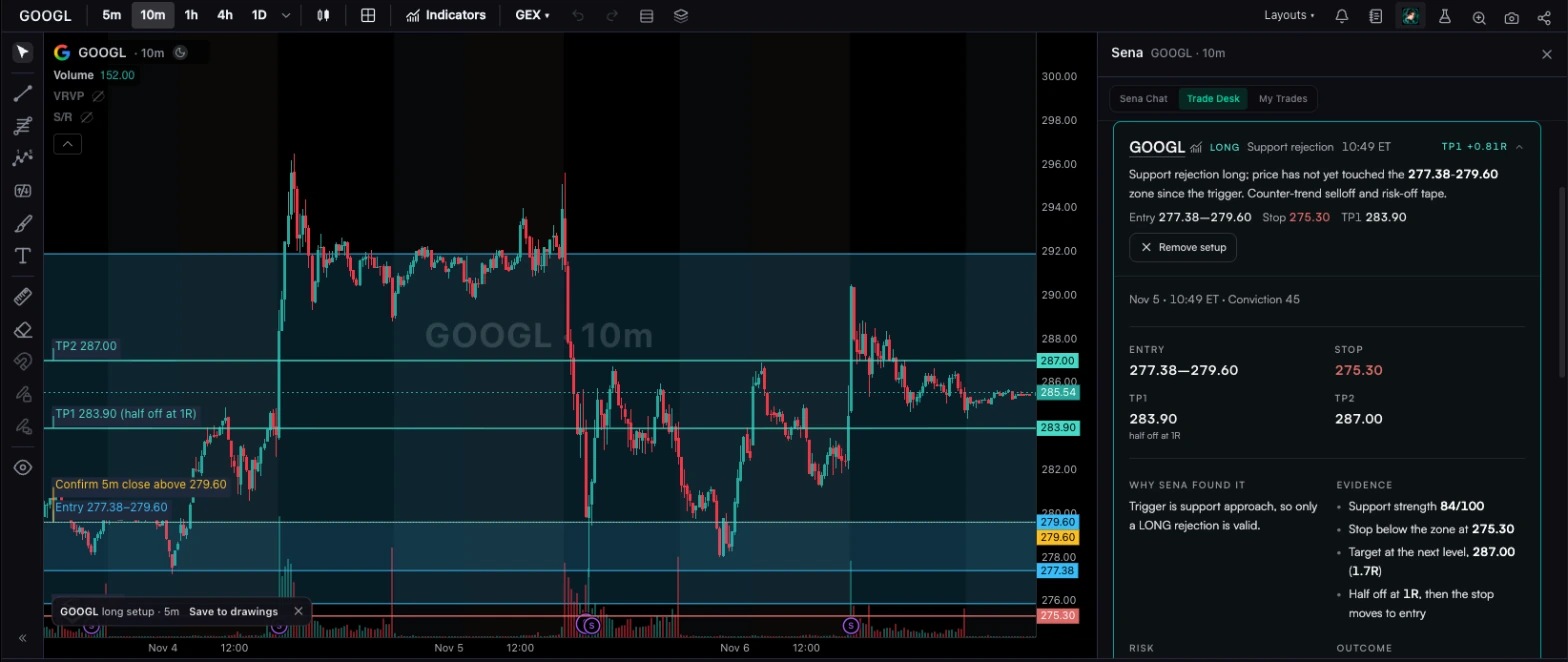
Step 5 · Follow it
Take it or just watch it. Sena keeps track.
Press “I took this trade” if you entered, or “Alerts only” to be told when it confirms and reaches each target. It moves to My Trades, and Sena watches it from Watch to Ready to the targets.
SPY
Short · Day
$766.85 Last price
WATCHWatching for activation
Activation needs a completed 15m close below $766.00. No entry is reported.
Your entry
—
Stop loss
$769.00
TP1
$764.00
TP2
—
Trade updates
- No update yet. Sena is watching the activation level.
Trade Buddy updates on Sena’s SPY short plan (entry below $766, stop $769, TP1 $764), in order:
- Entry condition confirmed at $765.90: Your entry condition confirmed. Check the entry you planned rather than chasing the move.
- You’re in at $765.90: You’re in. Let’s keep your risk and targets in view.
- Making progress at $764.35: Some breathing room now. Keep your planned stop and profit-management rules in view.
- Near your target at $764.25: Getting close to TP1. If taking partials was your plan, get ready.
- TP1 touched at $764.00: TP1 was touched. Check whether your planned partial actually filled.
Replay of Sena’s Sep 30 SPY plan through the Trade Buddy monitor, in the monitor’s own words.
- Level strength25
- Timeframes agree25
- Trend20
- Market context10
- 1-hour confirmation10
- Confluence10
Setup states
What each state means.
Watch
Waiting for the confirming close
Armed
Close to confirming
At risk
Near the invalidation
Ready
Confirmed on a closed candle
Entered
You took it; Sena watches
Targets touched
TP1, then TP2
Questions
AI trade setups FAQ
Can AI find trade setups?
Yes. Sena scans a set of liquid US stocks and ETFs on every closed 5-minute candle in regular hours, looks for price near strong support or resistance, open gaps, and support breaks on risk-off days, then writes a plan with an entry, stop and target, and scores it.
Which stocks does Sena scan?
Today Trade Desk scans 20 of the most traded names: NVDA, AAPL, MSFT, AMZN, GOOGL, META, TSLA, AVGO, AMD, NFLX, ORCL, PLTR, MU, TSM, HOOD, COIN, JPM, WMT, SPY and QQQ. In Sena Chat you can ask about any symbol.
What is the difference between Watch and Ready?
Watch means the setup is waiting for a candle to close beyond the trigger. Ready means that confirmation has already closed. Neither is an order: you decide whether to take the trade.
What is a day setup versus a swing setup?
A day setup uses 5-minute and 15-minute levels, allows no new entries after 2:00 pm ET and expires at the 4:00 pm close. A swing setup uses 1-hour, 4-hour and daily levels, and is skipped if earnings fall before it would expire.
Does Sena change its rules on crash days?
Yes. When QQQ is down 2% or more, or SPY 1% or more, Sena takes no new long setups and looks for clean support breakdowns as shorts instead.
Does Sena place the trade?
No. Tracking a setup means Sena watches it and tells you when it confirms and reaches its targets. You place every order with your broker.
Try it in Senntric
Let Sena find the setup. You decide on the trade.
Trade Desk scans on every closed 5-minute candle and shows every reason behind each idea.
Educational, not investment advice. Part of the Sena user guide.