Tutorial · Strategy Lab
Create a trading bot with AI. No code.
Describe your strategy in one sentence. Sena writes the rules, Strategy Lab backtests them on two years of candles after costs, and one click turns them into an agent that trades a paper account of its own on live prices.
Education, not investment advice. Sena never places trades.
Step by step
Your first bot, in seven steps.
About five minutes, start to finish. Everything below is the real Strategy Lab, with a QQQ idea that held up over two years.
1Step 1 of 7
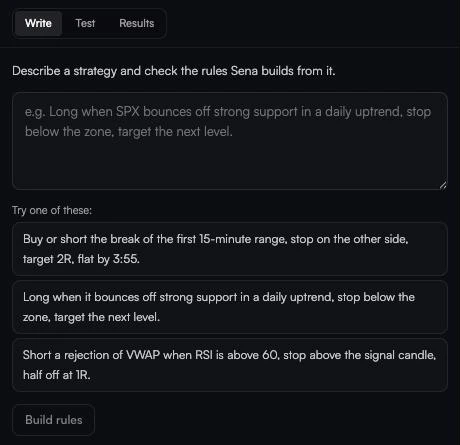
Describe your strategy
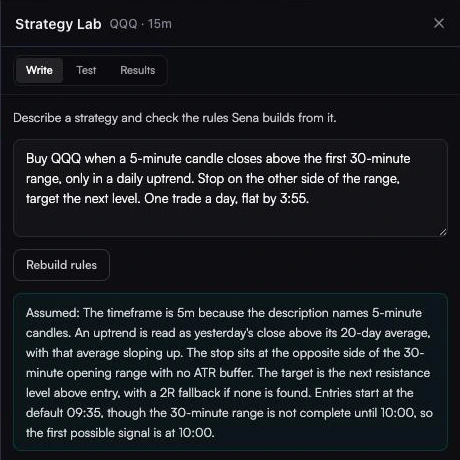
Open Strategy Lab with the flask button in the chart toolbar. In Write, say the symbol, the entry, the stop, the target and when to be flat, then press Build rules. Sena lists every assumption it made.Buy QQQ when a 5-minute candle closes above the first 30-minute range, only in a daily uptrend. Stop on the other side of the range, target the next level. One trade a day, flat by 3:55.
2Step 2 of 7
Check every rule
Each rule is a dropdown or a number: symbol and timeframe, direction, level, entry, filters, stop, target, trading hours and how much history to test. Fix anything Sena guessed wrong.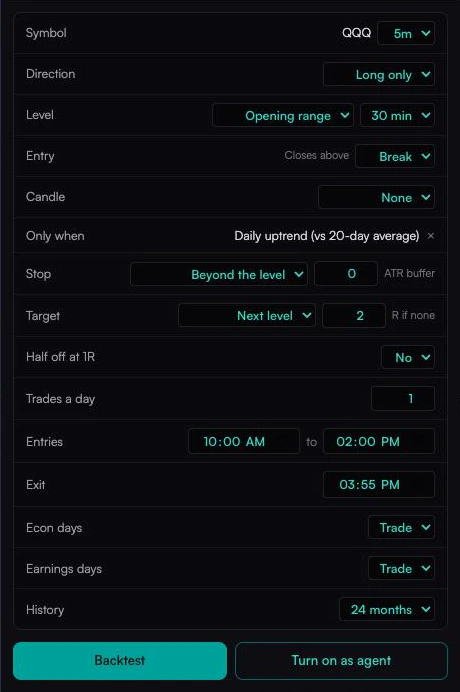
3Step 3 of 7
Backtest two years, after costs
Pick up to 24 months and press Backtest. This one held up: +0.09R a trade over 149 trades, 60% winners, and Proven Edge above zero. It was the third idea we tried; the first two did not, and most ideas won’t.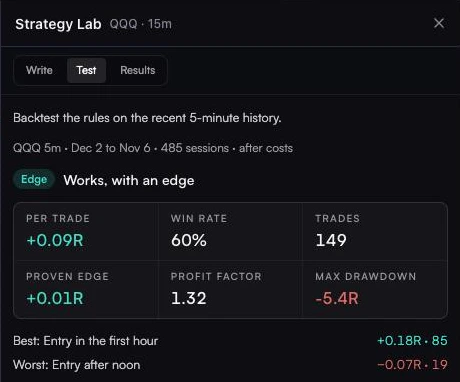
4Step 4 of 7
Turn it on as an agent
Press Turn on as agent. Name it, give it its own paper account and set the risk per trade. It sizes every trade from the distance to its stop.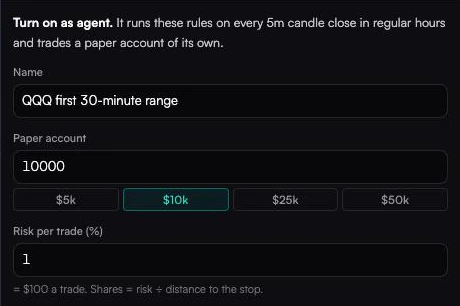
5Step 5 of 7
Set its limits and switch it on
Choose when it stops for the day and how it tells you about trades. The agent is judged against the backtest you just ran, so you can see if it keeps up.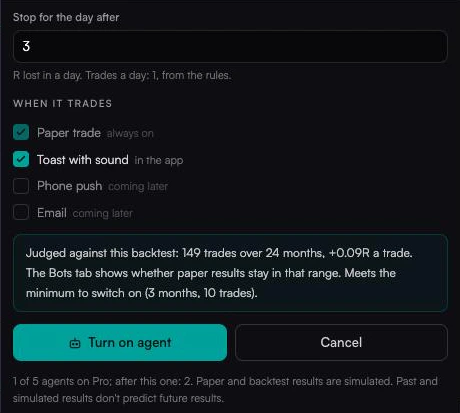
6Step 6 of 7
Watch it in the Agents tab
Open Trading in the chart toolbar, then Agents. Each agent shows whether it is running, today’s result and its paper equity. Click it for win rate, drawdown and paper results next to the backtest’s range, or to show its trades on the chart, edit it or delete it.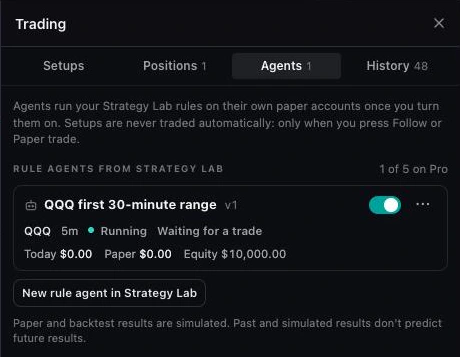
7Step 7 of 7 · Example
Judge it against its backtest
Click the agent to see its paper P&L, win rate, drawdown and every trade, with its equity line drawn over the range its backtest expects. This example fills the view with 20 trades from the agent’s own backtest, its best stretch (Sep to Nov 2025): 16 winners and +8.3R, or +$830 at $100 a trade, above the typical range. A live agent fills it with its paper trades.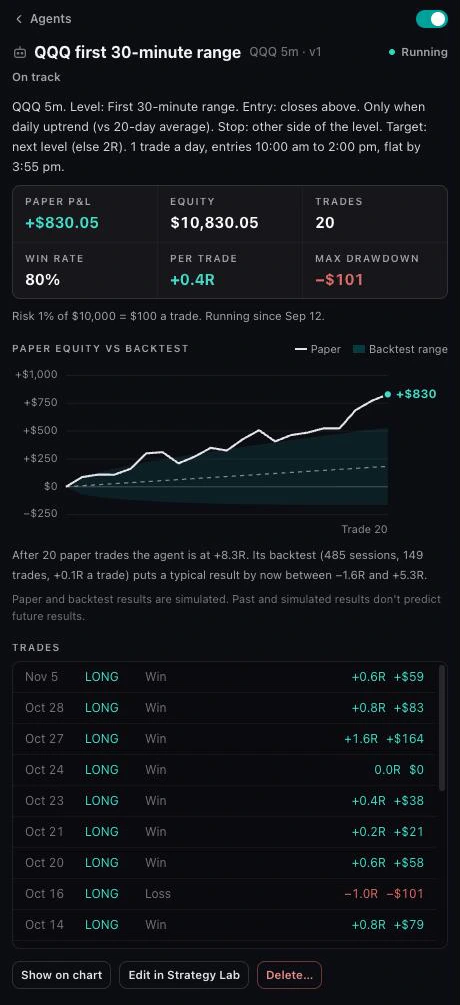
Ways to start
Your idea, a pattern or a remix.
Eight doors in. Every one leads through a backtest, the bar the agent has to clear.
Coming soon
Backtest
Up to 24 months, after costs
Works, with an edgeRunning on paper
Equity
$10,000
Risk
1% a trade
What every agent does
It trades your rules while you watch the market.
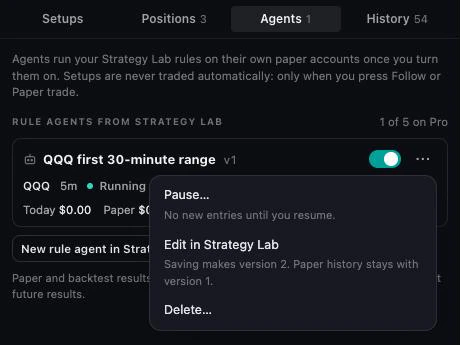
Pause it, edit it or delete it from one menu, any time.
Every candle close
5m, 15m or 1h
Sized from its stop
The risk % you set
Own paper account
$5k to $50k
Daily loss stop
In R
Toast with sound
Every entry and exit
Judged vs backtest
On track · Watch · Off track
Pause your way
Keep or close the trade
Versioned
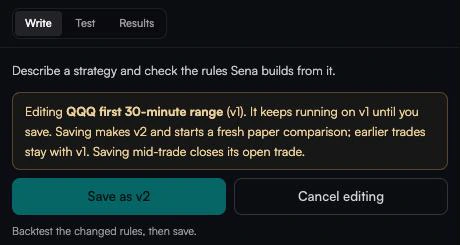
Old trades stay with v1
On your chart
Show on chart
Never real money
5 agents on Pro
Coming soon
Run your agents from Claude or ChatGPT.
Senntric is adding an MCP connector. Add Senntric in Claude, ChatGPT or Cursor, sign in with your Senntric account, and ask about your setups and agents in plain English, or tell an agent what to do.
Read
Your setups, positions and agent results.
Paper trade
Place paper trades through the same paper broker as the app.
Manage agents
Create, pause and stop agents. Turning one on asks you first.
Paper accounts only, with the same Pro limits as the app. Your AI can never place a real-money order.
Your AI assistant · example
How is my QQQ agent doing?
QQQ first 30-minute range: 20 paper trades, 16 winners, +8.3R (+$830). That is above the range its backtest expects.
Pause it before CPI tomorrow.
Ready to pause QQQ first 30-minute range. Confirm in Senntric.
What you can build
The building blocks Sena writes for you.
Levels
Opening range (5, 15 or 30 minutes), support/resistance zones, prior day’s high, low or close, premarket high or low, VWAP, or a moving average (SMA or EMA).
Entries
Break, touch, bounce or reclaim of the level, long, short or both.
Candle confirmation
None, engulfing, hammer or shooting star, or inside bar on the signal candle.
Conditions
Up to four filters: daily or intraday trend, RSI above or below a value, gap up or down, relative volume, and higher or lower volatility than usual.
Stops
Beyond the level or the signal candle (with an optional ATR buffer), an ATR multiple, or a percent of entry.
Targets
An R multiple, the next level, a trailing ATR stop, or no target with a time exit. Optionally take half off at 1R and move the stop to entry.
Timing
5-minute, 15-minute or 1-hour candles; an entry window and a flat time in New York time; up to five trades a day.
Calendar
Trade or skip high-impact US economic release days and the symbol’s earnings days.
Reading the result
Four verdicts, in plain English.
Results are in R: each trade’s result divided by its risk to the stop.
Works, with an edge
Proven Edge above zero: the profit is unlikely to be luck alone.
Made money, not proven yet
Positive on average, but not by enough to rule out luck.
Too few trades
Fewer than 30 trades. Test a longer history.
Doesn’t work as written
Lost money on average after costs.
Markets
US stocks, ETFs and indexes, plus crypto and forex with their own cost model. Futures and commodities are not supported yet.
Candles
5-minute, 15-minute or 1-hour rules, between 9:30 am and 4:00 pm ET.
History
3, 6, 12 or 24 months. Support and resistance rules go back 12 months.
Costs
Two cents a share round trip on stocks and ETFs, 0.1% on crypto and 0.02% on forex, taken off every trade.
Agents
Up to 5 running at once on Pro. Each needs a backtest of at least 3 months and 10 trades first.
Fair use
15 backtests an hour and 60 a day.
Questions
AI trading bot FAQ
Can I create a trading bot with AI and no coding?
Yes. In Senntric’s Strategy Lab you describe the strategy in plain English, Sena turns it into exact rules you can edit with dropdowns, you backtest it after costs, then turn it on as an agent that trades on paper, all without writing code.
Can I build a trading bot with ChatGPT or Claude?
You can ask a chatbot to write bot code, but you still need market data, a backtest engine that handles fills and costs honestly, and a way to run it live. Strategy Lab does those parts for you: the AI writes the rules, the engine tests them on real candles after costs, and an agent runs them on live prices. Senntric is also adding an MCP connector, so you will be able to check and manage your agents from Claude, ChatGPT or Cursor.
Does the trading bot use real money?
No. An agent trades a paper account of its own on live prices, sized by the account and risk you choose. Senntric never places real orders or connects to a broker.
How do I know if my trading bot works?
Look at the result after costs, the number of trades and Proven Edge. Strategy Lab needs at least 30 trades before it judges an edge, and calls a strategy “Works, with an edge” only when the conservative estimate stays above zero. Once it runs, the Agents tab shows whether its paper results stay in the backtest’s range. Forward testing vs backtesting.
How many trading bots can I run?
Up to 5 agents at once on Senntric Pro, each on its own paper account. Each one checks its rules on every candle close in regular hours.
What strategies can I build?
Strategies built from levels (opening range, support and resistance, prior day, premarket, VWAP, moving averages), entries (break, touch, bounce, reclaim), candle confirmations, up to four filters, stops and targets. Many common day-trading strategies fit.
Try it in Senntric
Test your bot before it costs you.
Strategy Lab turns one sentence into rules and a backtest after costs, then runs it as an agent on a paper account of its own.
Educational, not investment advice. Past results do not predict future results. See also Do AI trading bots work? and the Sena user guide.