The Senntric platform
The all-in-one AI trading terminal. Everything inside.
24 tools in one live workspace: charts, news, squawk, earnings, economic data, options positioning, market internals, alerts and an AI trading agent that works across all of them.
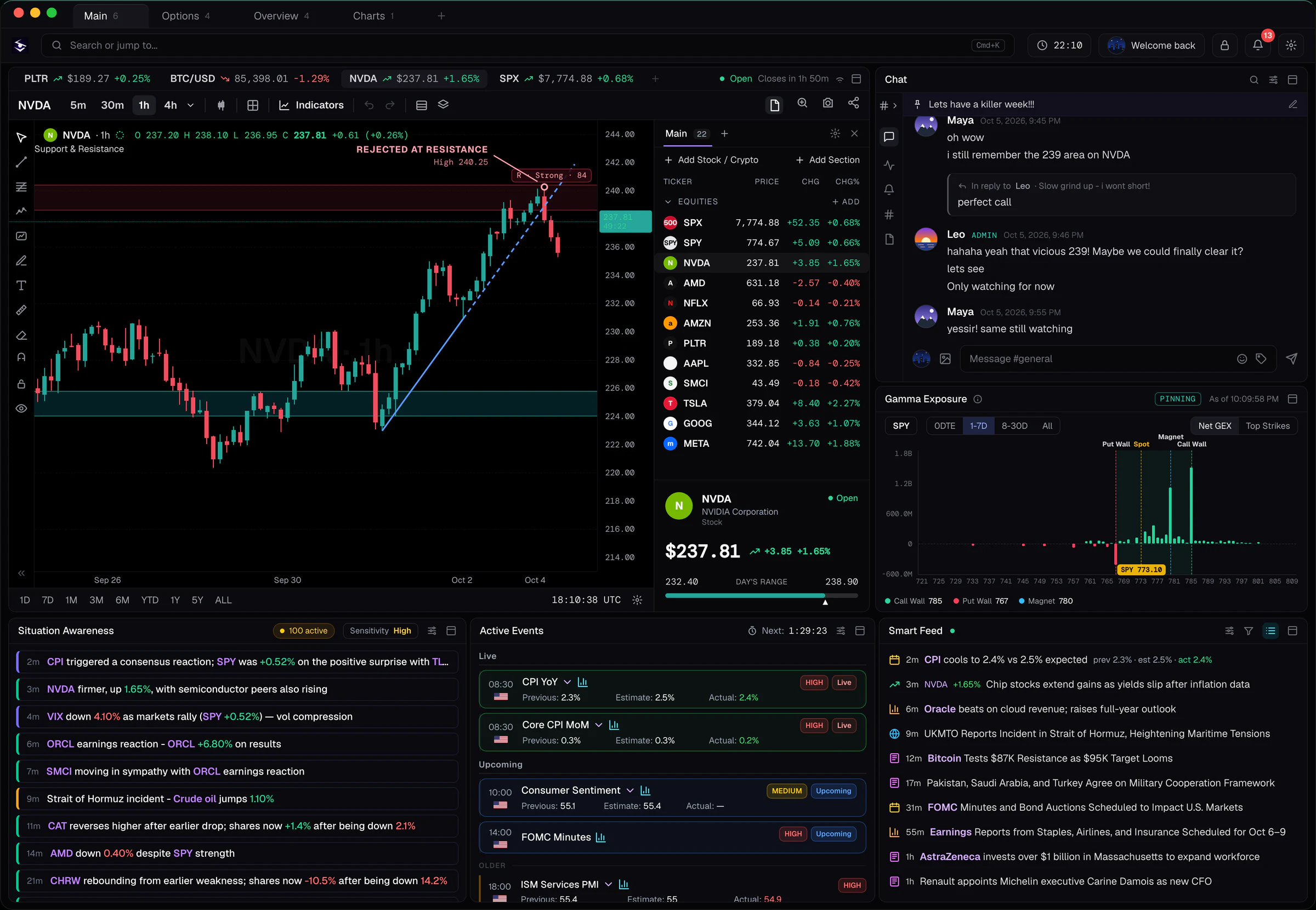
Every tool
Six desks, one workspace.
Open any of them from the command bar: type a symbol or what you want, and it opens in your workspace.
Charts and analysis
- Advanced charts
- Fast charts with indicators, drawings and saved layouts, from 1-minute to monthly
- Footprint charts
- Order flow inside each candle for Bitcoin and Ether
- Indicators and drawings
- Overlay studies and draw levels, trendlines and zones on any chart
- Watchlists
- Live quotes, moves and news flags for your symbols
News and events
- Smart Feed
- Market-moving headlines as they break, filtered to what matters
- Audio squawk
- Headlines read aloud, so you hear them without watching
- Active Events
- Breaking stories as threads that update as news develops
- Situation Awareness
- What just changed in the market, in one line, with the move attached
Earnings and economy
- Earnings calendar
- Who reports today and this week, with results as they land
- Historical reactions
- How each stock has moved after its recent reports
- Economic calendar
- CPI, jobs, Fed and other releases, with actual vs forecast
- AI release summaries
- What a data release said, in plain English, minutes after it prints
Positioning and internals
- Gamma exposure (GEX)
- Where options dealers’ gamma sits: put wall, call wall and magnet
- Gamma heatmap
- Gamma by strike and expiry at a glance
- Market Health and Risk Appetite
- Whether the market is in risk-on or risk-off mode, read for you each day
- Sectors and rotation
- Sector performance, breadth and where money is rotating
Alerts
- Price and chart-line alerts
- Set a level or draw a line; get alerted when price reaches it
- News, earnings and economic alerts
- Pop-ups and squawk the moment something you follow breaks
- Sena alerts
- Ask in plain English for price, moving-average and gap alerts
- Earnings reminders
- A nudge before your stocks report
AI
- Sena, your AI trading agent
- Ask about any stock; Sena checks live data before it answers
- Trade Desk
- Sena scans the most traded stocks for setups, with the entry, stop, target and reasons
- My Trades
- Track a setup; Sena watches it from Watch to Ready to its targets
- Strategy Lab
- Describe a strategy in plain English, backtest it after costs, then run it as an agent on paper
Know why it moved
News, squawk and context, the moment it happens.
The Smart Feed, audio squawk and Active Events catch the headline. Situation Awareness ties it to the move: what changed, which stocks reacted and how much.
Real-time market news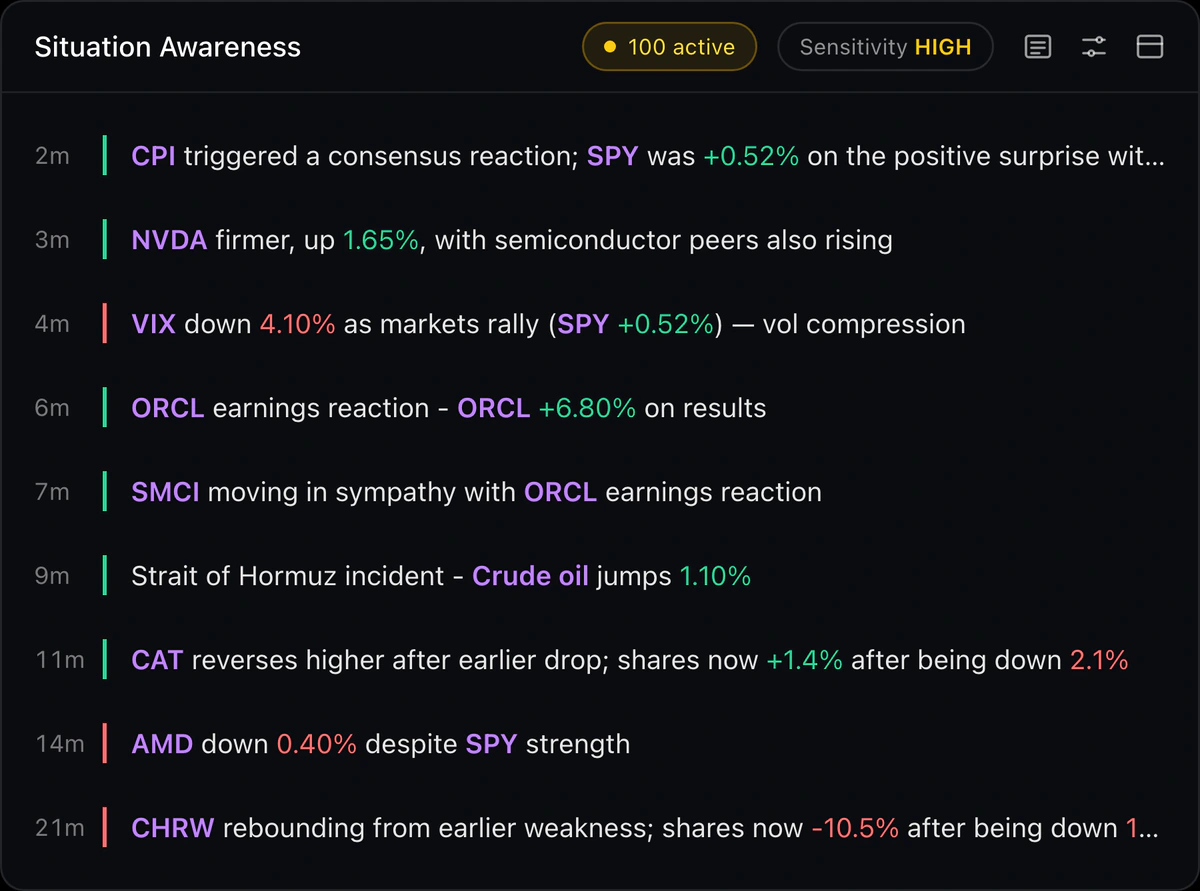
Your AI trading agent
Sena finds the setup, then keeps you to the plan.
Ask Sena about any stock and it reads live quotes, candles, levels, gamma and calendars before answering. Trade Desk scans for setups; track one and Sena watches it for you.
The Sena user guide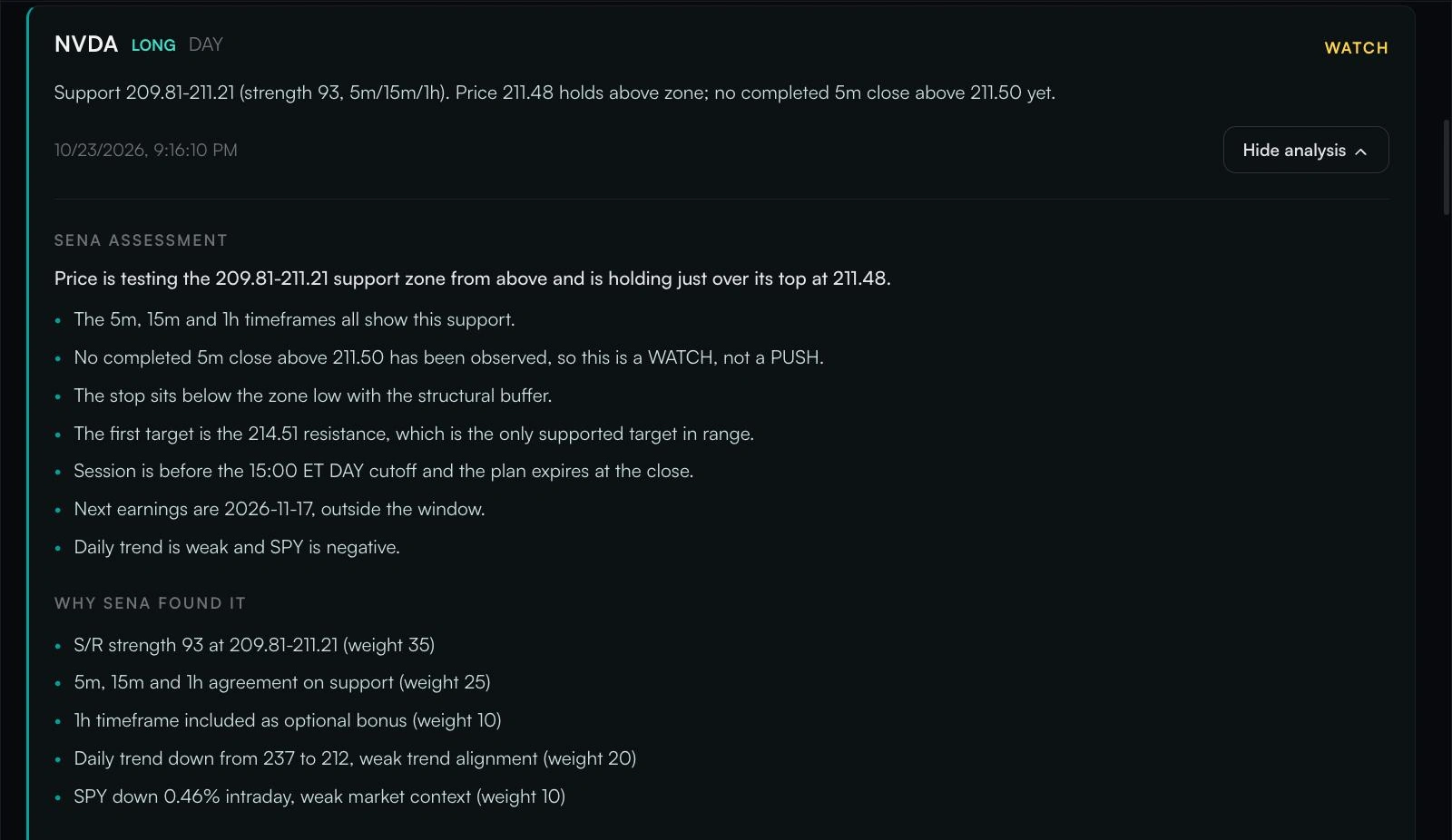
Positioning
See the positioning beneath price.
Gamma exposure shows where options dealers may buy or sell as price moves, with the put wall, call wall and magnet beside spot.
Gamma exposure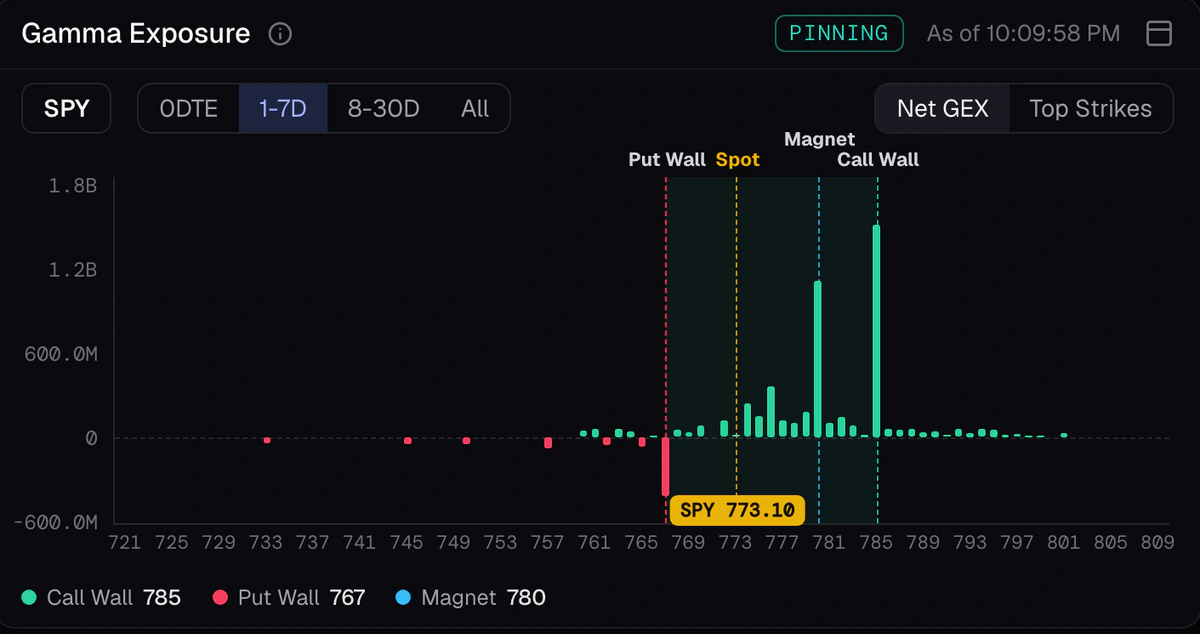
Market internals
Risk-on or risk-off, read for you every day.
Risk Appetite reads six internals, from high beta vs low volatility to credit spreads and the VIX, and gives one stance a day. Market Health scores the market’s condition beside it.
How to read risk-on vs risk-off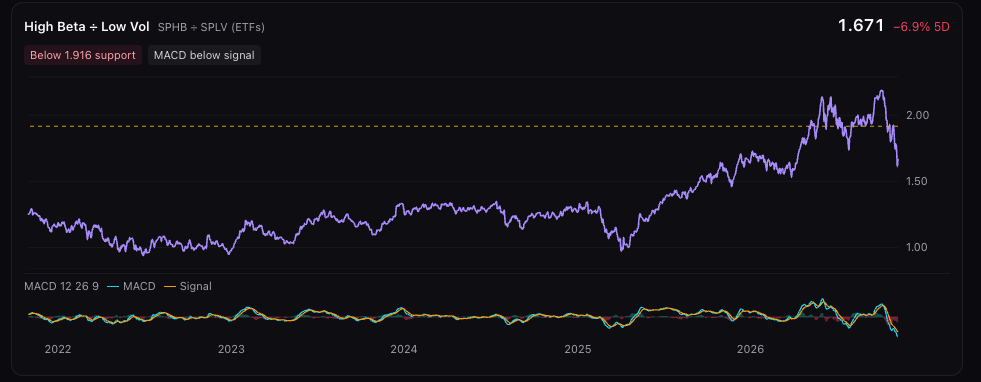
Strategy Lab
Test an idea before you risk money.
Describe a strategy in one sentence. Sena turns it into exact rules you can edit, Strategy Lab backtests them after costs, and a forward test runs them on live prices with simulated money.
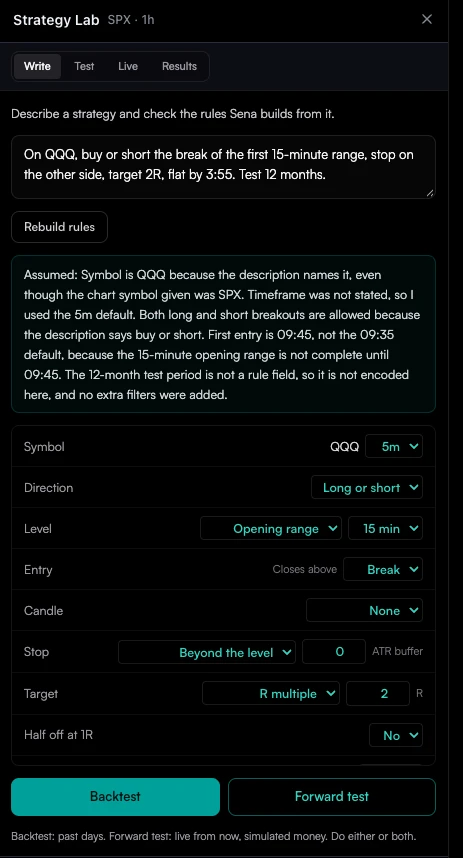
How traders use it
A trading day in Senntric.
01Before the open
Check the economic and earnings calendars, read Market Health and Risk Appetite, and let Trade Desk surface setups for the day.
02At the open
Charts, watchlist and gamma levels on one screen. Squawk reads the headlines so your eyes stay on price.
03When news hits
Situation Awareness shows what changed and which stocks reacted. Then ask Sena whether the move broke your levels.
04During the day
Sena and your price alerts watch your levels. You only look when something needs you.
05After the close
Earnings results and reactions as they land, then test tomorrow’s idea in Strategy Lab.
Straight answers
What Senntric doesn’t do.
Senntric gives you the information, the context and the tools. The decision and the trade stay yours.
- Place trades or connect to your broker to trade
- Promise profits or guaranteed signals
- Give personal investment advice
- Show you what is moving, why, and where the next setup is
Questions
Senntric FAQ
What is Senntric?
Senntric is an all-in-one AI trading terminal. It puts charts and indicators, live news and audio squawk, earnings and economic data, options positioning, market internals, alerts and Sena, an AI trading agent, in one workspace in your browser: 24 tools in all.
Does Senntric trade for me?
No. Senntric does not place orders or connect to a broker to trade. It finds setups, explains moves, watches your levels and tests your strategies; you place your own trades with your broker. Do AI trading bots work?.
What is Sena?
Sena is Senntric’s AI trading agent. It answers questions about stocks from live market data, scans for setups in Trade Desk, watches setups you track, and turns strategy ideas into testable rules in Strategy Lab. Meet Sena.
What markets does Senntric cover?
US stocks and ETFs first, with major indexes, plus popular crypto, forex and commodity symbols on the charts. News, earnings, economic data and options positioning focus on the US market.
Can I backtest strategies in Senntric?
Yes. In Strategy Lab you describe a strategy in plain English, check the rules Sena builds, backtest them after costs and forward test them on live prices with simulated money. How AI backtesting works.
Does Senntric work on my phone?
Yes. Senntric runs in the browser on desktop and phone, with the same workspace, alerts and squawk.
How much does Senntric cost?
Senntric has one paid plan with every tool included, with discounts for quarterly and annual billing. See the current price in the pricing section. See pricing.