Tutorial · Sena Chat
AI stock analysis: ask about any stock.
How to get AI stock analysis built on live data, not guesses: what to ask, what a good answer includes, and how to put the plan on your chart. Shown with Sena, Senntric’s AI trading agent.
Education, not investment advice. Sena never places trades.
Why an agent
What Sena checks before it answers.
A chatbot without live data can quote last year’s price. Sena calls these tools first, then answers from what it found.
Quotes and candles
The live price and historical candles on any timeframe
Market structure
Support and resistance, ranges, trendlines and open gaps
Options positioning
Gamma levels: the call wall, put wall and magnet
Sectors
How each sector is doing against the S&P 500
Calendars
Upcoming earnings and economic releases
Past reactions
How a stock or the market moved after earlier reports and releases
Step by step
Analyze a stock with AI, in two minutes.
A real QQQ plan from Sena, from the question to the levels on the chart.
1Step 1 of 4
Open Sena
Click the Sena button in the chart toolbar, or type /sena in the command bar. You land on Sena Chat, beside the chart you have open.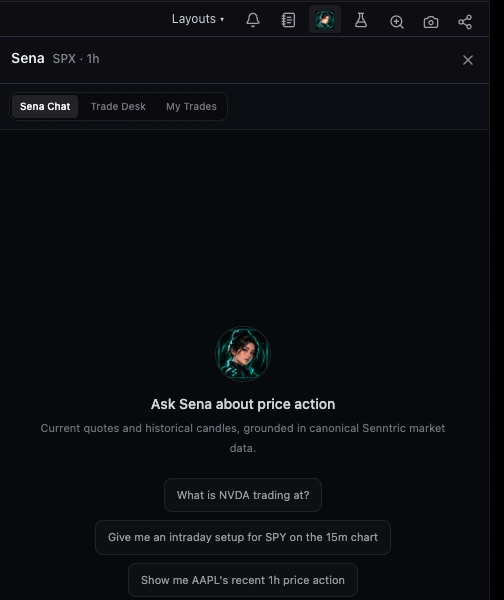
2Step 2 of 4
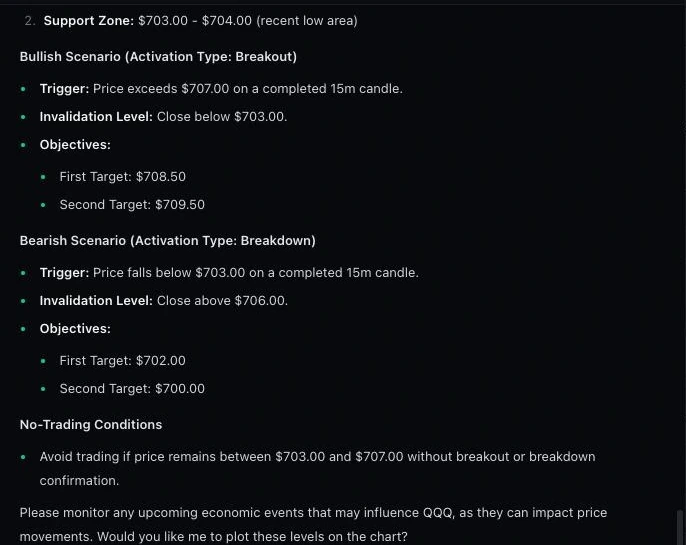
Ask with a symbol and a timeframe
The timeframe decides which levels matter. Sena checks live candles, levels, gamma and the calendar, then writes both scenarios, each with a trigger on a closed candle, an invalidation and targets.Give me an intraday setup for QQQ on the 15m chart
3Step 3 of 4
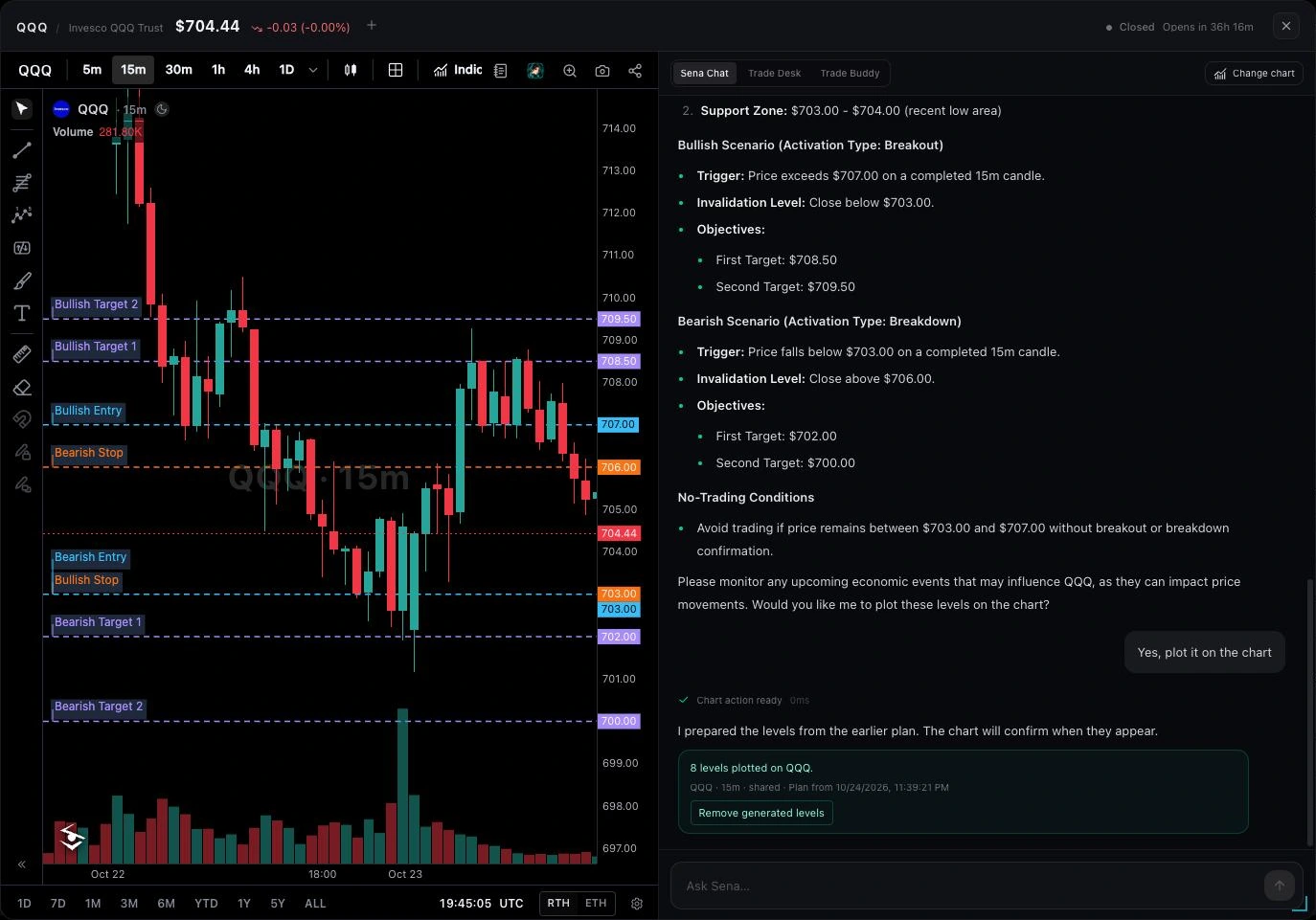
Plot it on your chart
Say “plot it” and every level goes onto your chart, labelled. One button removes them again.Yes, plot it on the chart
4Step 4 of 4
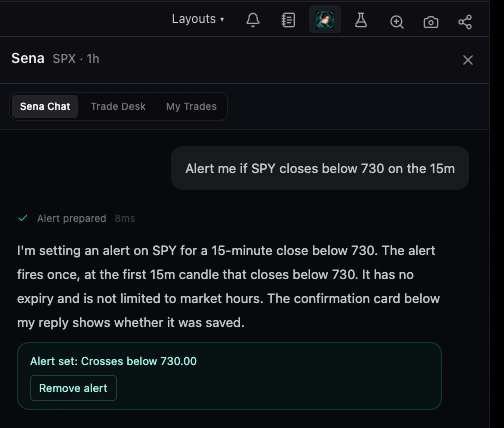
Set an alert at the trigger
So you do not have to watch. Sena saves it straight away and confirms under its reply.Alert me if SPY closes below 730 on the 15m
Check the answer
What a good AI analysis always includes.
Use this checklist on any AI answer, from Sena or anywhere else.
A trigger on a closed candle
“Price exceeds 707 on a completed 15m candle”, not “around 707”. A wick is not a signal.
Where it is wrong
An invalidation level, so you know the exit before you enter.
Targets from real levels
Objectives taken from support, resistance or the range, not round numbers.
Both directions
What happens above and below, so you are not anchored to one view.
When not to trade
A no-trade zone, or a plain “no clean setup” when there is none.
Red flag: a reason with no source
If an AI explains a move it cannot see in the data, it is guessing.
Prompt library
Six prompts to copy. Change the symbol.
Levels
Where are NVDA’s nearest support and resistance on the 1h?
A setup
Give me an intraday setup for QQQ on the 15m chart
Earnings
How has AMD moved the day after its last four earnings?
Options
Where are SPY’s call wall and put wall today?
Sectors
Which sectors are leading the S&P 500 this week?
Before a release
What is on the economic calendar tomorrow, and how did SPY react to the last CPI?
Questions
AI stock analysis FAQ
Can AI analyze stocks?
Yes, if it can see live data. A general chatbot answers from what it learned in training and can get prices and levels wrong. An AI agent like Sena calls data tools first, quotes, candles, support and resistance, gamma levels and calendars, then builds its answer from what it found.
What is the best prompt for AI stock analysis?
Name the symbol, the timeframe and what you want: “Give me an intraday setup for SPY on the 15m chart” or “Where are NVDA’s nearest support and resistance on the 1h?”. Then ask follow-ups about earnings, gamma levels or the calendar.
Is AI stock analysis accurate?
It is only as good as its data and its honesty about uncertainty. Check that every price in the answer matches your chart, that triggers wait for a closed candle, and that the plan says where it is wrong. Treat it as analysis, not a prediction.
Can Sena tell me why a stock moved?
Only when the data shows it, for example an earnings report or an economic release. Sena does not read the news feed and will not invent a reason. In Senntric, Situation Awareness and the Smart Feed show the news behind a move.
How is this different from ChatGPT?
ChatGPT and other general chatbots usually answer without a live market feed. Sena works inside Senntric with live market data, plots its plan on your chart, can set alerts and watches setups you follow.
Try it in Senntric
Ask Sena about your next trade.
Live data, a plan on your chart and an alert at the trigger, in one conversation.
Educational, not investment advice. Part of the Sena user guide.