Tutorial · TradersPost & SignalStack
TradersPost setup, step by step.
Connect your broker to TradersPost or SignalStack, copy one webhook URL and paste it into your Senntric trading agent. From then on every trade the agent takes on paper also goes to your broker, with its stop and target.
Education, not investment advice. Sena never places trades.
1 · Senntric
Your rule agent
Decides each entry and exit, with its stop and target, on its own paper account.
2 · Your router
 TradersPost
 SignalStack
Your account, your plan. It holds the broker connection.
3 · Your broker


14 stock brokers, plus crypto exchanges.
Supported brokers
TradersPost and SignalStack supported brokers.
Pick your broker to see which router reaches it from a Senntric agent, what it can trade there and whether it has a paper account. Checked November 15, 2026.
Interactive Brokers
Senntric agent TradersPost or SignalStack Interactive Brokers
TradersPostBeta
Stocks and ETFs · paper account
SignalStack
Stocks and ETFs · paper account
SignalStack needs a funded IBKR account; its paper account runs under it.
Tutorial · TradersPost
How to use TradersPost with your agent.
Seven steps, shown on our own QQQ agent and its TradersPost Paper strategy.
1Step 1 of 7
Connect a broker, or start on paper
In TradersPost open Brokers, then Connect Broker, and filter by Stocks. Pick TradersPost Paper first: it needs no broker and lets you watch the agent’s orders before real money is involved. Add your real broker later the same way.
TradersPost · Brokers › Connect Broker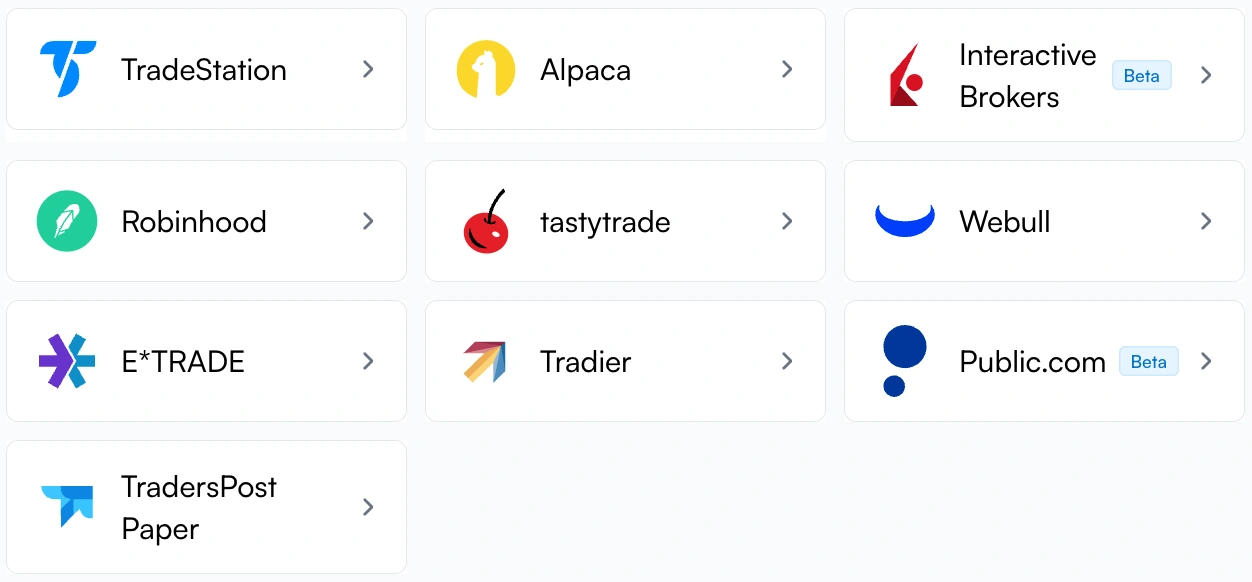
1. Start here: no broker needed 2. Or your own broker 2Step 2 of 7
Create a strategy for your agent
Open Strategies, then New Strategy. Name it after your agent, choose Stocks (or Crypto for a crypto agent) and keep Allow signal overrides ticked. One strategy per agent keeps every agent’s orders apart.
TradersPost · Strategies › New Strategy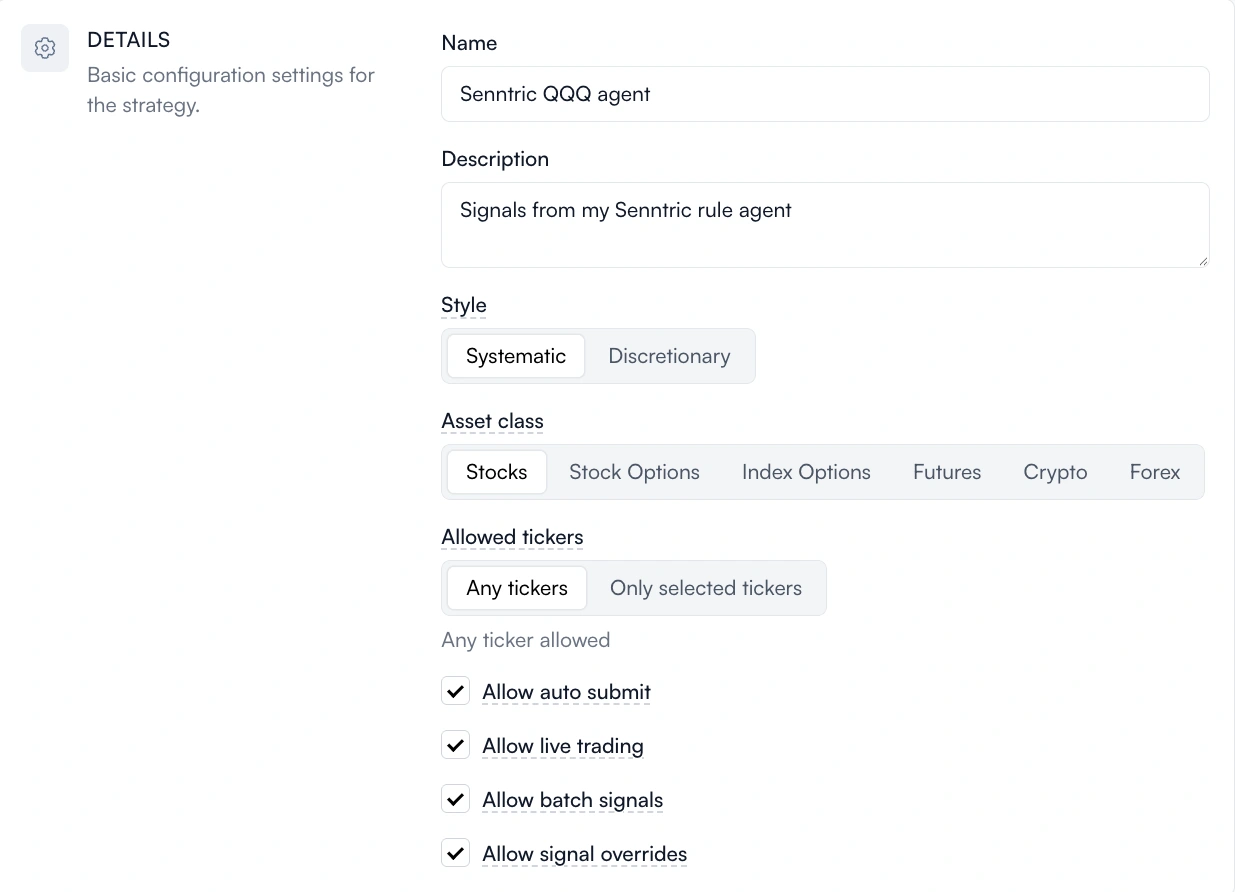
1. Name it 2. Stocks 3. Keep overrides on 3Step 3 of 7
Copy its webhook URL
Open the strategy and press Webhook. This URL is where your agent sends its trades. Press Copy. Treat it like a password: anyone who has it can send orders to your strategy.
TradersPost · Strategy › Webhook
1. Copy 4Step 4 of 7
Subscribe it to your account
Press Subscribe on the strategy. Choose Auto Submit so orders go straight through, pick the account you connected in step 1, and leave Allow signal overrides on. Free trials auto-submit on paper only; live accounts need a paid TradersPost plan.
TradersPost · Subscriptions › Edit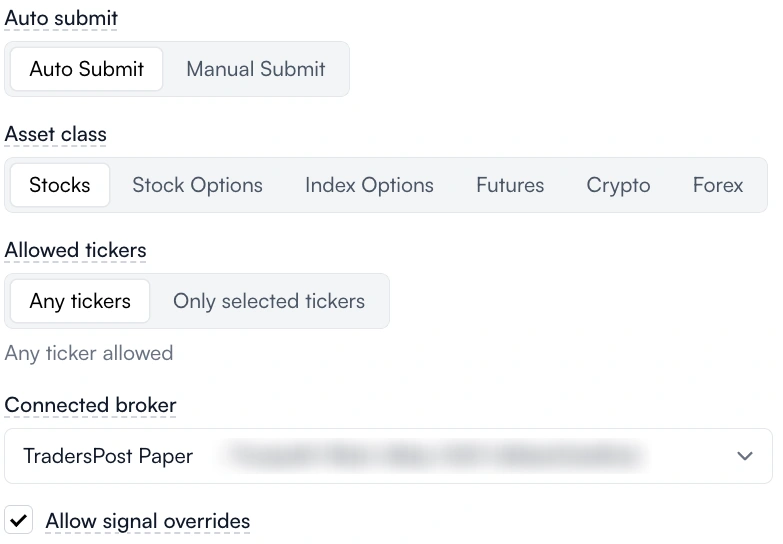
1. Auto Submit 2. Your connected account 3. Overrides on 5Step 5 of 7
Let the agent’s stop and target through
Further down the subscription, under Take profit / stop loss attached to entry, keep both Allow signal override boxes ticked. Every entry your agent sends carries its own stop and target; with these on, TradersPost attaches them to the order. Save.
TradersPost · Subscription › Entry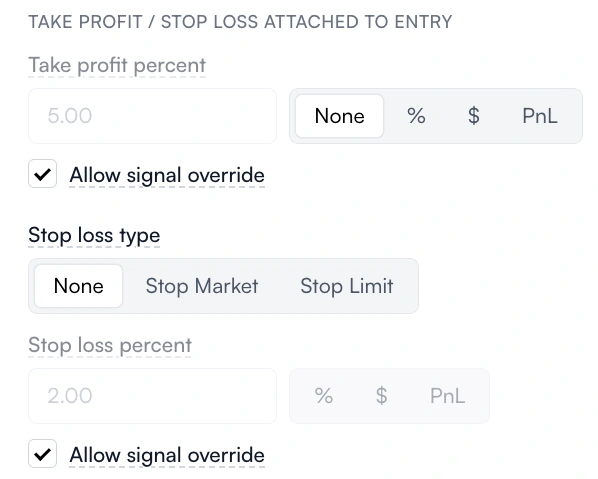
1. Agent’s target 2. Agent’s stop 6Step 6 of 7
Paste it into your Senntric agent
In Senntric open Trading, then Agents, and click your agent. Under Send to broker, pick TradersPost, paste the URL and press Save and turn on. Senntric asks once more before anything is sent.
Senntric · Trading › Agents › QQQ first 30-minute range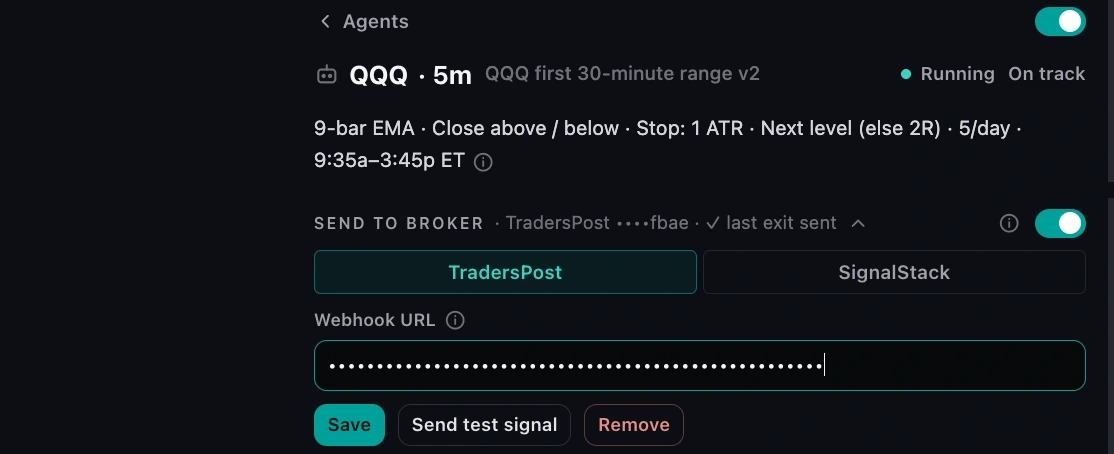
1. Your agent 2. TradersPost 3. Paste URL 4. Save 7Step 7 of 7
Watch every trade arrive
From now on each paper fill is also sent to TradersPost: the entry with its stop and target, a part exit at the first target, and the exit. Senntric marks each one Sent; TradersPost lists it under Signals as 1 / 1 Completed. These are the QQQ agent’s real signals from November 13.
Senntric · Send to broker log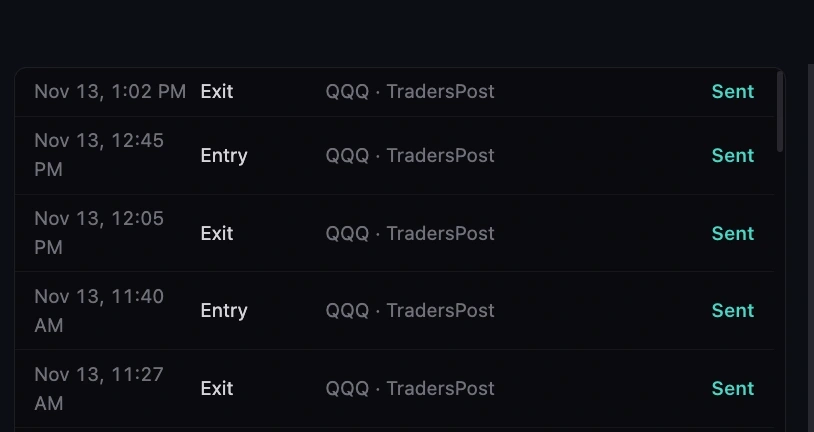
1. Sent TradersPost · Strategy › Signals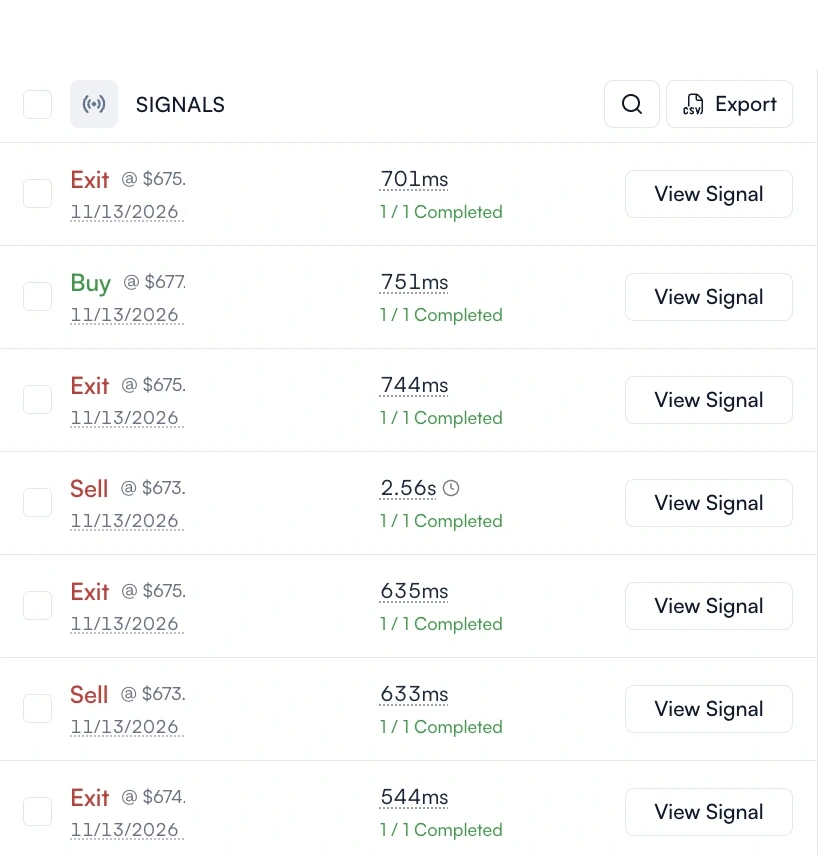
1. Completed in under a second
Tutorial · SignalStack
SignalStack setup, for Schwab and more.
- 1
Connect your broker in SignalStack
Sign up at SignalStack, open the broker directory and press Connect Broker next to yours. This is the route for Charles Schwab, Lightspeed, Lime, TradeZero and Tiger Brokers.
- 2
Copy that connection’s webhook URL
Each broker connection in SignalStack has its own webhook URL. Copy it, and keep it private.
- 3
Paste it into your agent
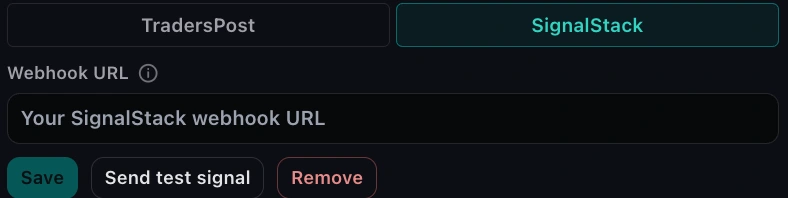
In Senntric pick SignalStack under Send to broker, paste the URL and save. Senntric only accepts URLs on signalstack.com.
Before you test: SignalStack has no test mode. Senntric’s Send test signal buys 1 share at market on the connected account, and asks you to confirm first. Use a paper connection.
Which router
TradersPost vs SignalStack for an agent.
TradersPostSignalStack$49/month
Starter plan: 1 live and 4 paper accounts. 7-day free trial, paper only.
$22.50/month
Basic plan, billed $270 a year: 50 signals a month. A free version allows 5.
9
Plus TradersPost Paper and crypto exchanges.
13Has Schwab
Including Charles Schwab.
YesOnly TradersPost
The stop and target are placed with the buy, so your broker closes the trade even if Senntric goes offline. Most stock brokers support it.
No
Only the buy goes to your broker. Senntric watches the stop and target and sends the sell when one is hit.
Free, buys nothingOnly TradersPost
The test only checks that the connection works.
Buys 1 share
Its test is a real order, so test on a paper account.
IncludedOnly TradersPost
TradersPost Paper: no broker needed.
Only your broker’s
Works only if your broker offers paper trading.
Yes
Stock and index options: TradeStation, tastytrade, E*TRADE, Tradier and more.
Yes
Schwab, Interactive Brokers, tastytrade, Tradier and more.
Yes
Tradovate, NinjaTrader, TradeStation, tastytrade, ProjectX.
Yes
Tradovate, Ironbeam, Optimus Futures, TradeStation.
No
No forex connection yet.
YesOnly SignalStack
OANDA, FOREX.com and MetaTrader 5 brokers.
Accounts
Plan plus $10/month per extra live account.
Signals
Each order it sends counts as one signal.
Prices from traderspost.io/pricing and signalstack.com/pricing, November 15, 2026. SignalStack is running 50% off a first annual plan this month. Options, futures and forex are what each router supports; a Senntric agent sends US stocks, ETFs and crypto today.
If something looks wrong
Troubleshooting, from our own tests.
TradersPost shows “0 / 1 Completed”
It received the signal and rejected it. The reason is on its Trades page: often the asset class or a ticker the strategy doesn’t allow.
“Calculated a quantity of zero” on crypto
Turn on Allow fractional quantity in both the strategy and the subscription. Fractional means long only, so set the agent to longs.
A row says Unknown
The router didn’t answer in time, so it may or may not have the order. Senntric never retries these on its own: check the router first, then Send again within 30 minutes if it’s missing.
Paused the agent?
No new entries are sent. Exits of trades already sent still go, so nothing is left open at your broker.
Senntric never holds your broker login
Your router connects to your broker. Senntric only sends it signals.
The URL is stored encrypted
Only its last four characters are ever shown again, and it is never logged.
Only rules you built
Rule agents you made in Strategy Lab can send. Sena Agents stay on paper.
One switch stops it all
Stop all broker sending halts every agent at once, from the Agents tab.
Build the agent first. Then connect it.
$99/month. Describe a strategy, backtest it after costs, run it on paper, then send it to your broker. How to build the agent.
Questions
TradersPost and SignalStack FAQ
What brokers does TradersPost support?
For stocks: Interactive Brokers (beta), Robinhood, Webull, tastytrade, E*TRADE, TradeStation, Tradier, Alpaca and Public.com (beta), plus its own TradersPost Paper account. It also connects crypto exchanges (Coinbase, Kraken, Binance, Bybit, Crypto.com) and futures brokers, 20 connections in all.
Does TradersPost work with Charles Schwab?
Not yet. Schwab is the broker TradersPost users request most. SignalStack does connect to Schwab, so a Senntric agent can reach a Schwab account through SignalStack.
Does TradersPost support Interactive Brokers?
Yes, for stocks, in beta, with paper trading. SignalStack also connects to Interactive Brokers but needs a funded IBKR account.
Is TradersPost free?
It has a free 7-day trial that auto-submits to paper accounts; live accounts can be tested with manual approval. Live auto-submit starts with the Starter plan at $49 a month.
Where do I find my TradersPost webhook URL?
Open the strategy and press Webhook. The dialog shows the URL with Copy, Generate New and Signals buttons. Generate New replaces it, so paste the new one into your agent if you ever do.
TradersPost or SignalStack: which should I use?
TradersPost if your broker is on its list: it attaches the agent’s stop and target to the order and has a free paper account to test on. SignalStack if your broker is only there, such as Schwab: it sends market orders, and its free plan covers 5 signals a month.
Can Sena trade my real account?
No. Only rule agents you build and turn on yourself can send to a broker. Sena Agents and Sena’s trade ideas stay on paper.
What does Senntric send to TradersPost?
One signal per paper fill: the entry with the agent’s stop and target, a part exit at the first target, and the exit, whatever closed it. Each fill is sent once, even if the agent restarts.
TradersPost and SignalStack are separate services you sign up for and pay yourself; Senntric is not affiliated with either. Educational, not investment advice. Automated orders can lose money. See also the best AI trading bots.